Key Takeaways
- An account isolation browser is a browser workspace model for separated account sessions, not only a privacy feature.
- Social media teams need clean browser lanes when several operators and account clusters share the same workflow.
- The value comes from session control, reviewer clarity, and cleaner recovery when a run pauses.
- A pilot should test lane integrity, ownership visibility, and blocked-case handling before scale.
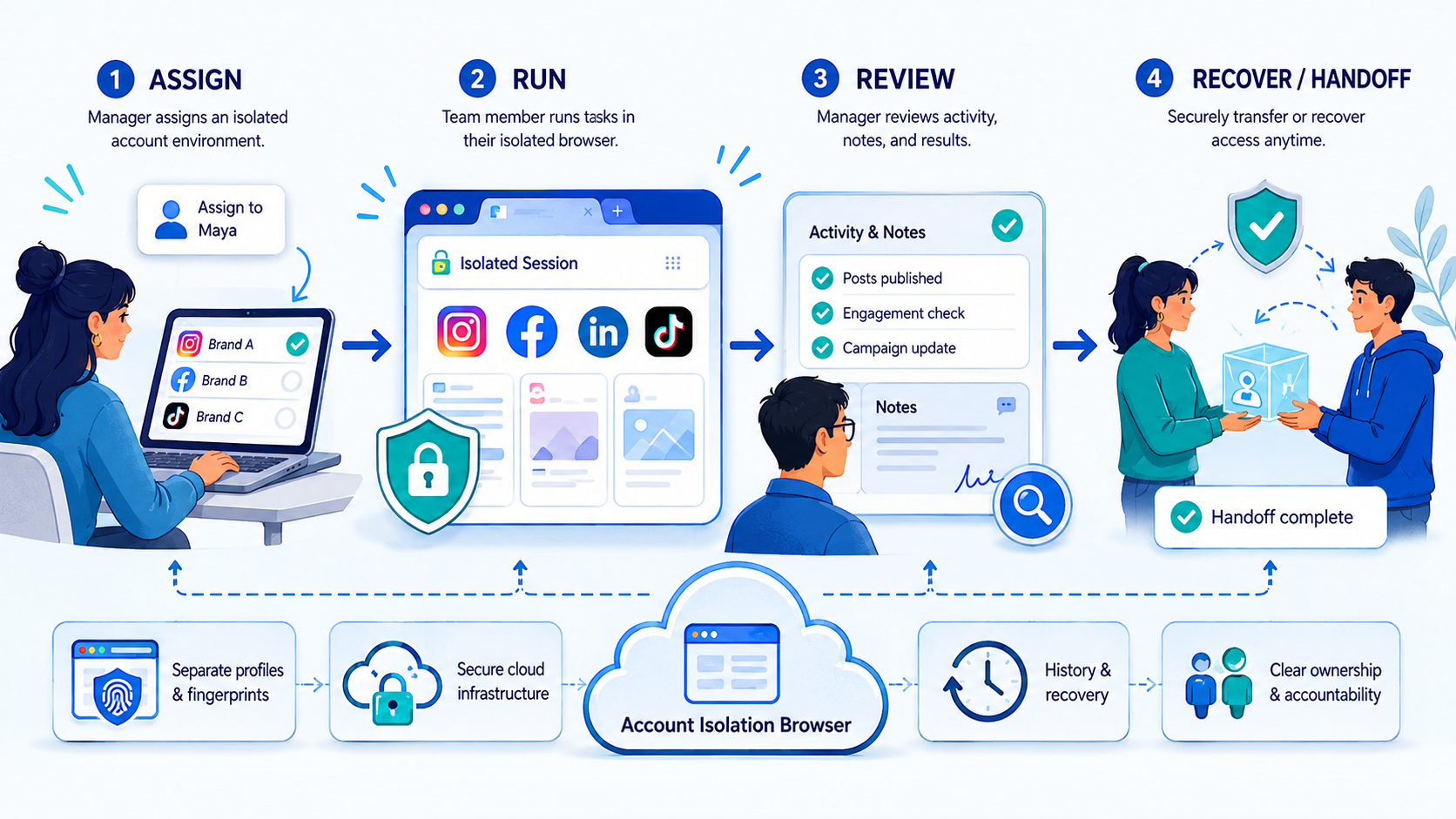
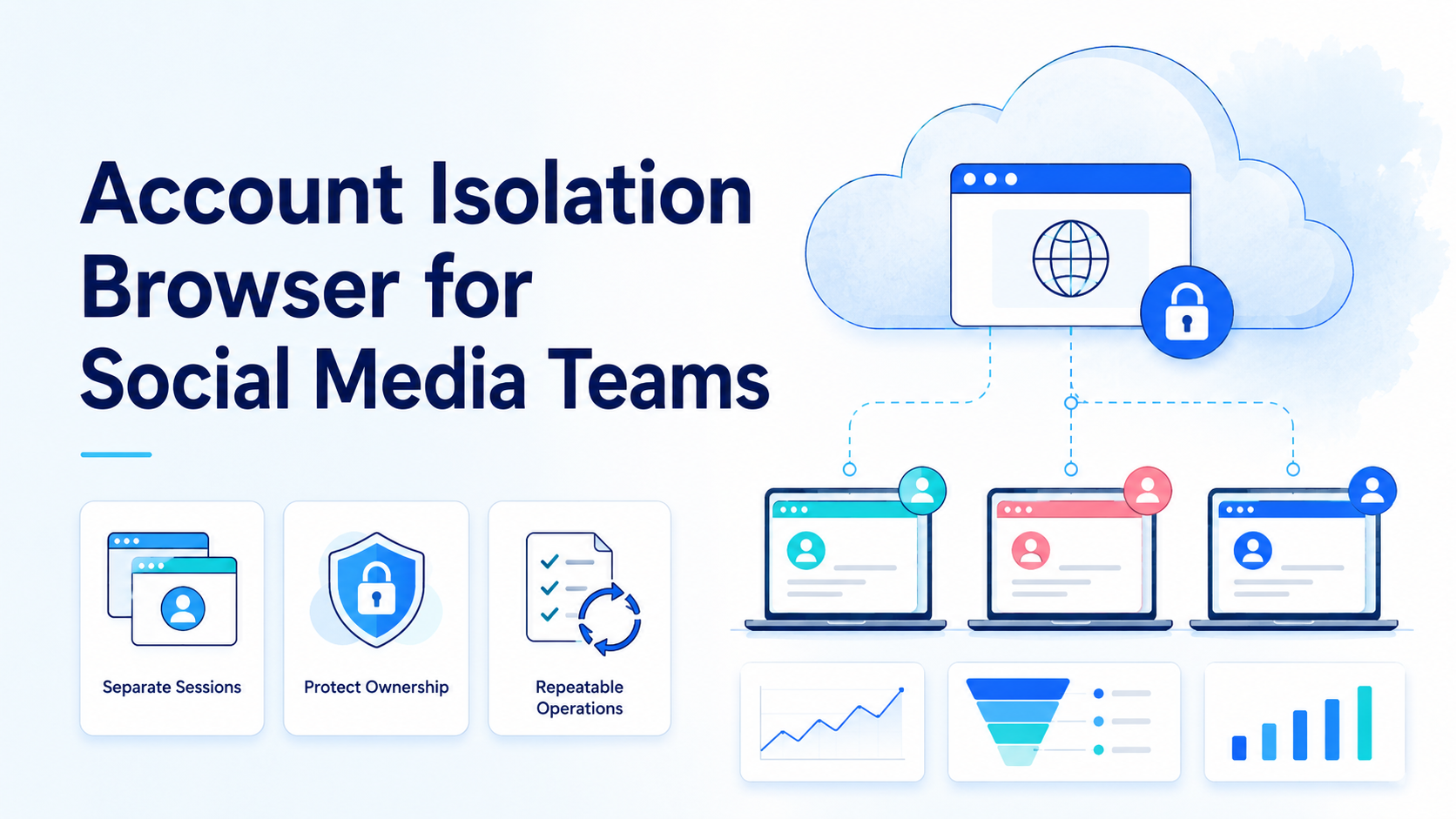
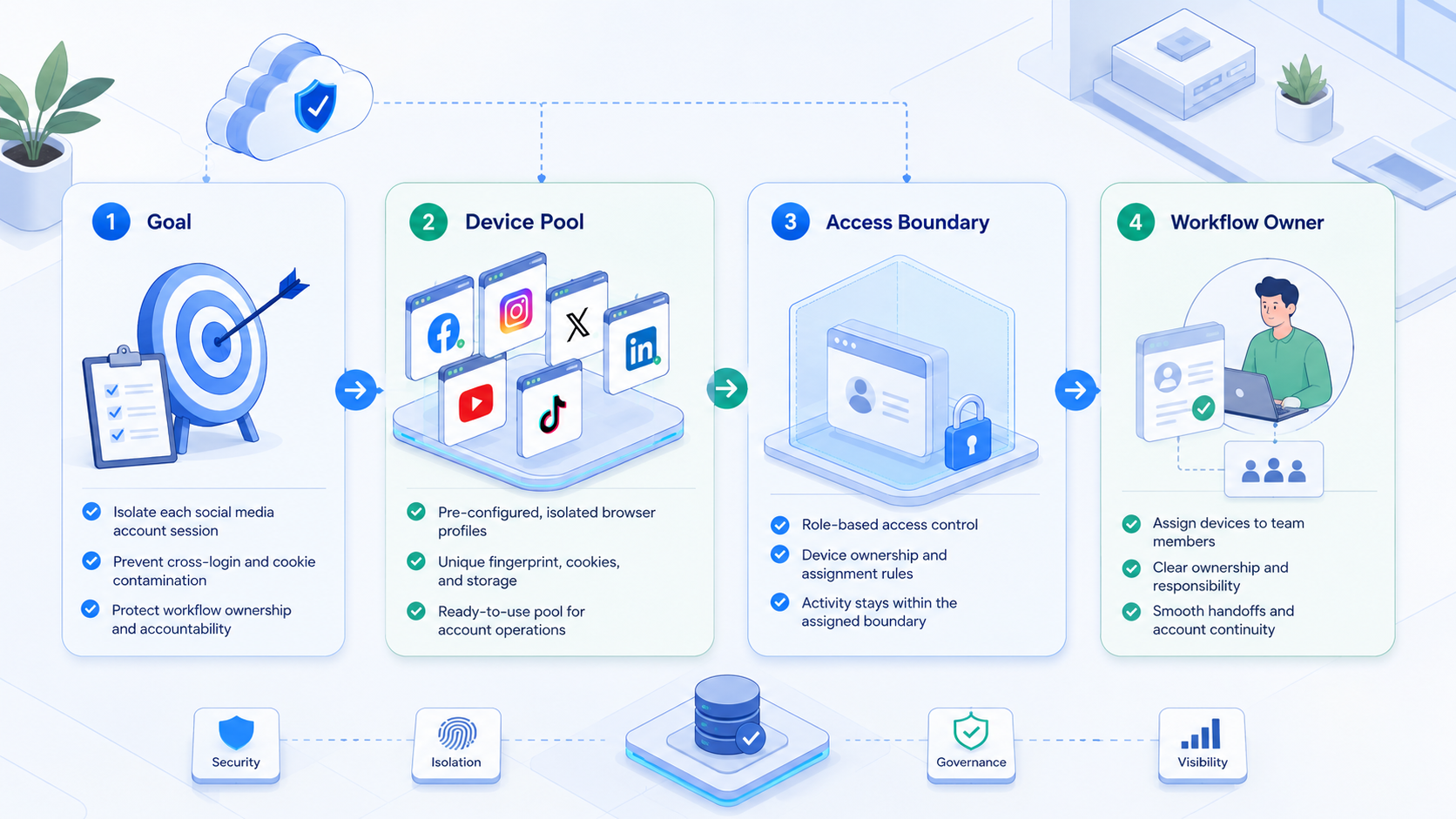
An account isolation browser is a browser setup that keeps each account lane inside a separated session, profile, or workspace so the team can run repeatable account tasks without mixing context. It is not only a browser for hiding tabs. A strong setup also defines which operator owns the lane, which workflow is allowed inside it, and what happens when a task pauses or fails.
This matters because social media teams do real work inside browser sessions every day. They review inboxes, scheduled posts, asset approvals, dashboard settings, creator outreach, and moderation queues. Once several account groups share the same operator pool, browser context becomes an operational dependency.
That is why many teams look at MoiMobi as execution infrastructure rather than only another browser tool. The useful question is not "can it open more profiles?" The useful question is "can the team use separated browser lanes to keep account work inspectable and easy to hand off?"
Primary sources support that framing. Playwright browser contexts and W3C WebDriver both make explicit session control central to browser work.1 2 Meta Business Help and TikTok Support also reflect account-side workflows that depend on browser surfaces and clear ownership.3 4
What Is Account Isolation Browser for Social Media Teams?
The simplest explanation is this: an account isolation browser is a workspace layer that prevents different account lanes from sharing the same browser state.
A usable setup usually separates four things:
| Layer | What stays separate | Why it matters |
|---|---|---|
| Session state | Cookies, active logins, tabs | Prevents context drift |
| Operator ownership | Who can act in the lane | Improves accountability |
| Workflow scope | What tasks the lane handles | Keeps work focused |
| Recovery path | How blocked runs restart | Makes pauses easier to manage |
That is why this topic overlaps with device isolation, Android antidetect, and multi-account management. The browser is only one part of the operating system. The real goal is to keep account work from bleeding across lanes.
Why Account Isolation Browser for Social Media Teams Matters
The first benefit is simpler ownership. When each account cluster has its own browser lane, the team can tell who touched the account, which workflow ran there, and what the next step should be.
The second benefit is cleaner recovery. If one run pauses inside a separated lane, another operator can reopen the same lane and continue with less confusion.
The third benefit is reduced workflow collision. Content review, inbox work, account settings, and reporting often need different cadence and approval rules. When those jobs run in one shared browser state, the team creates ambiguity even if the tool itself still works.
One concrete example is a team that handles both campaign publishing and creator replies for the same brand family. If those actions happen in one pooled session, reviewers may struggle to know which state belongs to which workflow. A separated browser lane makes that boundary visible.
Key Benefits and Use Cases
The biggest misunderstanding is that this kind of separated browser workspace is only for technical users who want more profiles. The more practical benefit is operational clarity for teams.
Common use cases include:
- Account-based publishing: keep each client or region in its own browser lane.
- Inbox and comment review: avoid mixing support and community work across unrelated accounts.
- Dashboard management: separate reporting and settings tasks from content workflows.
- Reviewer handoff: let a second operator reopen the same lane and continue with context.
One useful side effect is better internal auditability. A manager can inspect which lane owns the account, what tasks are allowed there, and where a blocked step stopped. That is harder when the team shares one browser state and relies on memory.
Teams comparing profile tools may also want the Android fingerprint browser alternative page because it already connects browser profile control with mobile execution.
Another benefit is cleaner workflow transfer between teams. A publishing reviewer, support reviewer, or account lead can enter the same separated lane later and still understand what the previous operator did. That continuity matters when several functions touch the same account pool over time.
One more gain is policy clarity. Teams can tie each lane to a narrow operating rule, such as "review only," "publishing only," or "reporting only." That makes training simpler because new operators inherit a lane standard instead of an informal habit.
How to Get Started with Account Isolation Browser for Social Media Teams
Start with one account cluster and one browser task family.
- Choose one group of accounts, such as one client, region, or creator segment.
- Assign one separated browser lane to that group. Do not reuse it for unrelated workflows.
- Define what that lane is allowed to do, such as inbox review, content approval, or account checks.
- Record who owns the lane and who handles blocked cases.
- Expand only after another operator can reopen the lane and explain the next action without extra context.
Use a short pass or fail check:
| Check | Pass | Fail |
|---|---|---|
| Lane ownership | One operator or team owns the lane | Anyone can act without review |
| Task scope | The lane has a clear workflow purpose | The lane handles unrelated jobs |
| State clarity | A second reviewer can reopen the session and understand it | Only the original operator knows what happened |
| Recovery path | Blocked cases restart in the same lane | Operators rebuild work from scratch |
If browser work later hands off to mobile actions, cloud phone and mobile automation are the natural next pages.
Operational Signals That Show the Setup Is Working
A separated browser model should create signals a manager can verify in minutes. If the team cannot inspect those signals, the setup is still too dependent on memory.
Use this operating review:
| Signal | Healthy pattern | Weak pattern |
|---|---|---|
| Lane naming | The lane purpose and owner are obvious | Names are generic and reused |
| Task notes | The next action is visible in the lane record | Context lives in chat only |
| Review timing | Review happens at the same stage each time | Review points move unpredictably |
| Recovery record | Blocked runs reopen with the same state and owner | Retries start in a fresh uncontrolled session |
That review is useful because it keeps the conversation focused on workflow quality rather than on browser count. More profiles do not create a better system if nobody can tell which lane is healthy and which lane is noisy.
Common Mistakes to Avoid
The first mistake is treating isolation as a naming convention instead of an execution boundary. Separate labels do not help if the same browser state is still shared under the hood.
The second mistake is letting one lane cover too many unrelated jobs. A session meant for comment review should not quietly become a lane for creator outreach and account settings changes.
The third mistake is ignoring handoff quality. Browser isolation is most useful when a second operator can inherit the same context without private explanation.
What not to do
- Do not pool unrelated account groups into one browser lane.
- Do not let blocked runs restart in a different uncontrolled session.
- Do not treat "more profiles" as proof of better workflow control.
- Do not expand to more accounts before the first lane survives review handoff cleanly.
One practical failure mode appears when a team gives each operator many profiles but no ownership model. The browser is technically separated, but the workflow is still noisy because nobody knows which lane owns the next decision.
Another failure mode appears when the lane exists, but the team keeps moving related work into personal tabs outside the controlled workspace. That habit breaks the evidence trail and makes recovery much harder when a run stops halfway through.
Who It Fits and When It Is a Strong Match
This model is a strong fit for teams with repeated browser-side account work and real handoff pressure. It is weaker for one-off use with no account-pool complexity.
Strong match
- Agencies managing several client account clusters.
- Teams running content, inbox, and reporting workflows in parallel.
- Cross-border operators who need separated regional browser lanes.
- Managers who need visible ownership and cleaner review transfer.
Weak match
- Single-account workflows with no repeated handoff.
- Teams that still share one operator and one browser state.
- Projects where every task is a custom one-off path.
- Setups with no reviewer or blocked-case owner.
Pilot Rollout, Measurement, and Recovery Checks
The pilot should prove that the browser lane is easier to inspect and recover, not only easier to launch.
Track the first rollout with a simple scorecard:
| Check | Healthy sign | Failure sign |
|---|---|---|
| Lane integrity | Each account cluster stays in one browser lane | Sessions are reused unpredictably |
| Owner clarity | The next actor is visible | Operators ask who should act next |
| Review transfer | A second operator can inherit the lane quickly | Handoff depends on private chat |
| Recovery quality | Blocked runs restart from a known state | Retries start from guesswork |
| Scale readiness | The pattern fits the next account cluster | Complexity rises faster than clarity |
A useful test is to pause one lane on purpose. If the rest of the matrix still remains clear and active, the isolation model is probably strong enough to scale. If one blocked lane confuses the rest of the team, the workflow boundaries are still too weak.
It also helps to ask a different reviewer to inspect the lane history and explain the next approved action. If they can do that quickly, the team has likely built a real operating lane instead of a renamed profile.
Frequently Asked Questions
Is a separated browser lane the same as a browser with profiles?
Not exactly. Profiles help, but the real value comes from workflow boundaries, ownership, and recovery discipline.
What should teams isolate first?
Start with one account cluster and one repeated browser task family.
Why does lane ownership matter?
Because session separation is less useful if nobody knows who owns the next action.
Does this fit agencies?
Yes, especially for client clusters that share the same operator team.
What is the first warning sign?
Operators cannot explain which lane owns the current account state.
Can browser isolation work with mobile execution?
Yes. Many teams review in the browser and complete other steps in a mobile lane.
What should the pilot measure?
Lane integrity, owner clarity, handoff quality, and recovery quality.
When should teams stop expansion?
Pause when blocked lanes create more confusion than clarity.
Conclusion
This browser model works when the browser is treated as an execution lane with ownership and restart rules, not just a collection of extra profiles.
Check these points before scaling:
- one account cluster per lane
- one clear workflow scope
- visible owner and reviewer path
- restartable blocked runs
If those checks hold, the team is ready to expand the next lane with less operational drift.
Sources