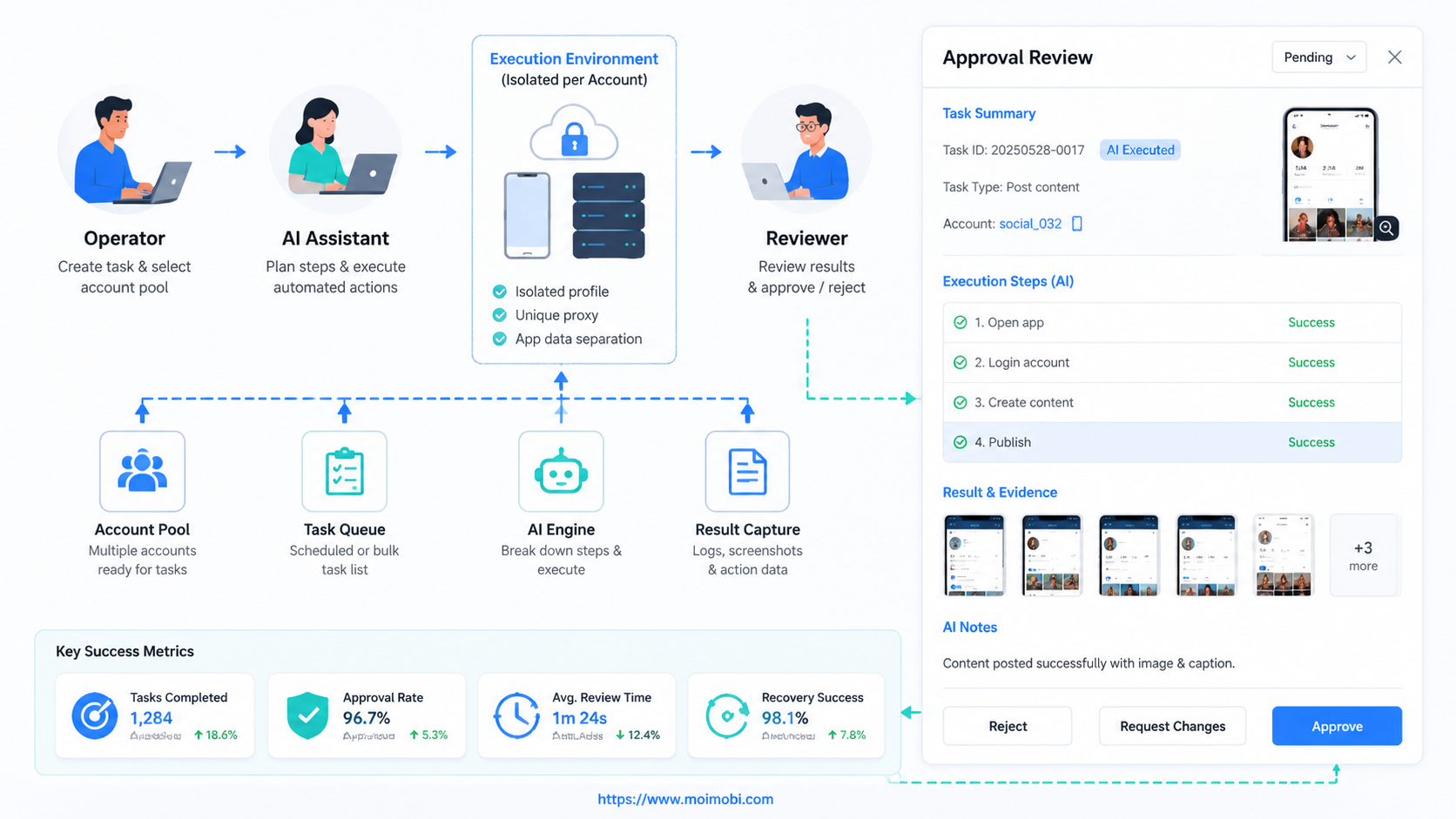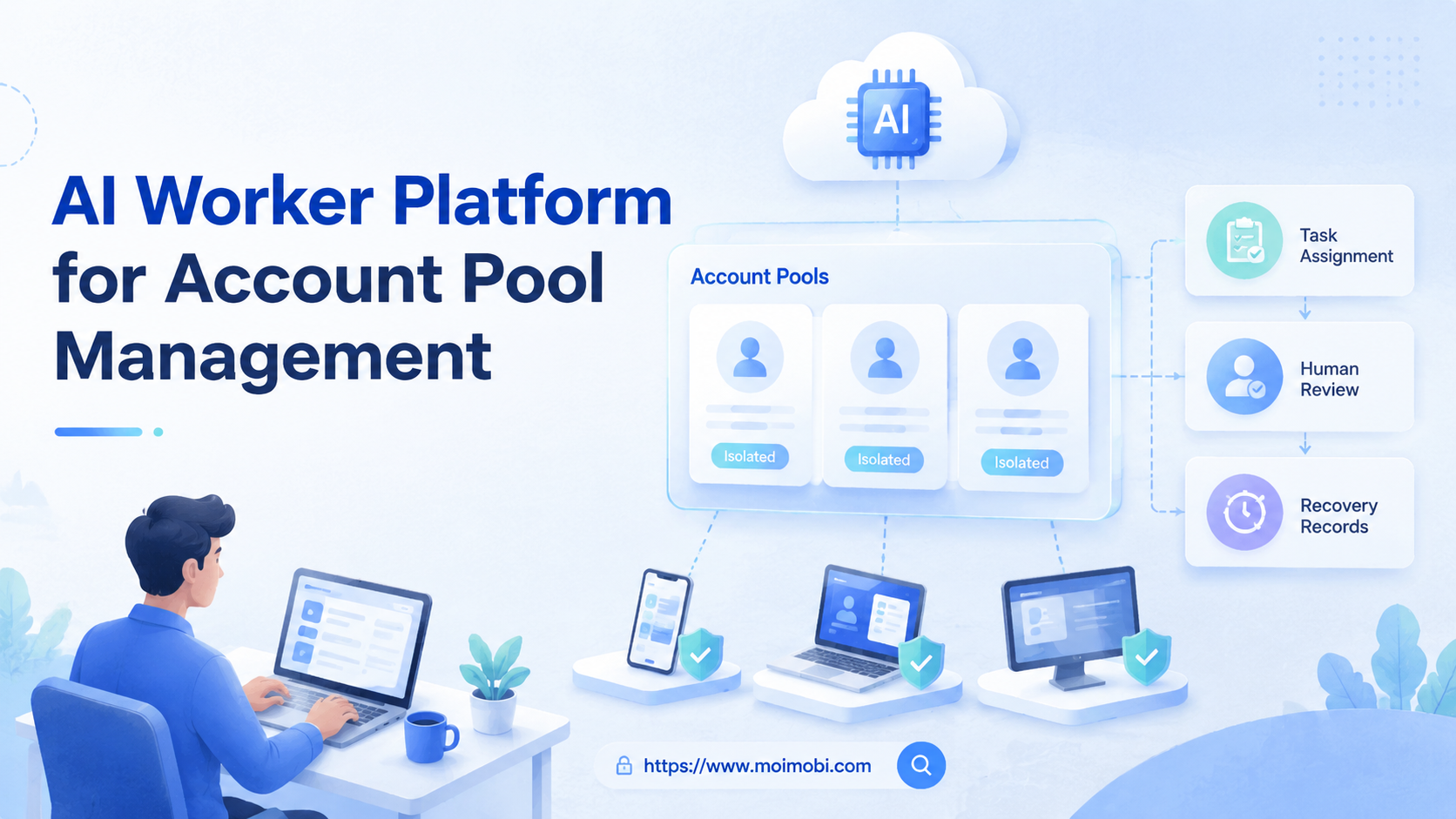
An AI worker platform is a system for assigning repeatable account-based work to AI workers inside controlled browser and mobile environments. For account pool management, the core job is not only automation. The system must decide which account acts, which environment it uses, who reviews the action, and how the outcome is recorded.
This matters when a team operates many social, marketplace, creator, or customer-contact accounts. Without a clear platform model, operators share logins, mix sessions, lose task history, and struggle to see which account is ready for which workflow. MoiMobi addresses this as an AI browser and cloud phone platform built around execution environments, account separation, and workflow control.
Key Takeaways
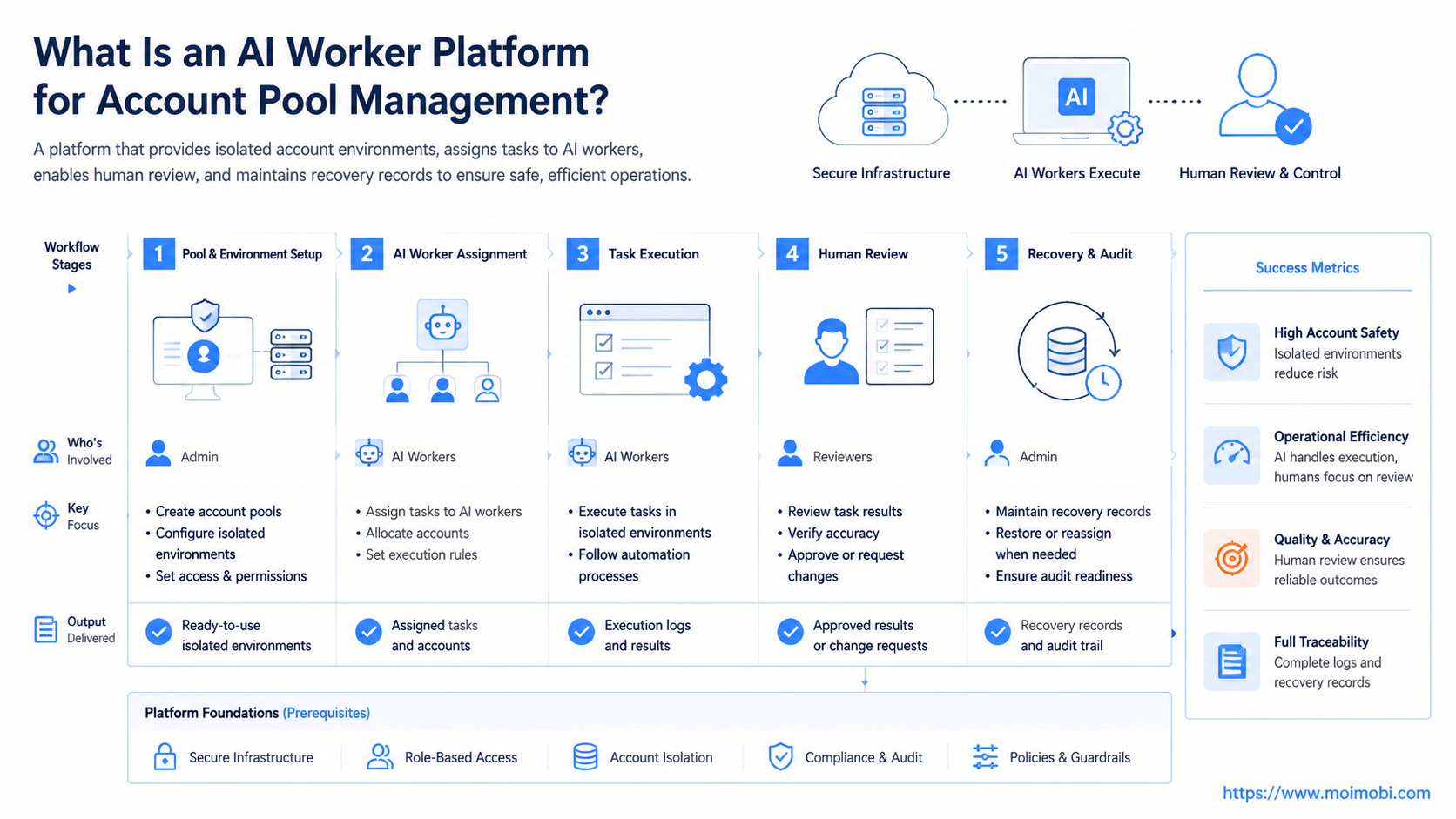
- Account pool management needs role assignment, environment isolation, task queues, and review records.
- AI workers work best when each account has a known workspace and a narrow task boundary.
- Browser profiles fit web dashboards and logged-in web work; cloud phones fit mobile app workflows.
- Human approval should stay in the loop for sensitive replies, policy issues, payment actions, and account changes.
- A good pilot measures completion rate, review edits, exception reasons, and account readiness before scaling.
What Is an AI Worker Platform for Account Pool Management?
For account pool management, an AI worker platform is a control layer that connects accounts, execution environments, tasks, and review rules. It is not just a chatbot that writes messages. It is closer to an operations desk where digital workers receive scoped tasks and run them through assigned account environments.
The account pool is the set of accounts a team operates. That pool might include TikTok profiles, Instagram accounts, WhatsApp business numbers, Telegram accounts, storefront accounts, or browser-based dashboards. Each account needs an owner, a login state, an environment, and a task history.
Browser automation standards show why the idea of a session matters. The W3C WebDriver specification defines browser automation through sessions and commands, while Playwright documents browser contexts as isolated browser sessions. Business operators do not need to think like test engineers, but the same principle applies: tasks become easier to audit when the environment is explicit.
For mobile-first work, account environments also include Android devices or cloud phones. Android Enterprise documentation describes managed Android devices as work environments, which is useful context for teams that separate business use from uncontrolled personal devices. In MoiMobi terms, the platform combines browser profiles, cloud phones, account workspaces, task queues, and records.
Why an AI Worker Platform Matters for Account Pools
Account pools become hard to manage when teams scale by adding more accounts without adding control. One operator may use a browser profile. Another may use a phone. A third may update a spreadsheet after the fact. The work might still get done, but the manager cannot see state, risk, or ownership.
The platform model turns account operations into four connected layers:
- Account identity: Which account is this, and who owns it?
- Execution environment: Which browser profile, cloud phone, or Android device is assigned?
- Task workflow: What should the AI worker do, pause, retry, or escalate?
- Result record: What happened, which account acted, and what changed?
This structure is also more realistic than giving one AI agent a broad instruction such as “manage all accounts.” Broad instructions create unclear responsibility. A narrow worker that checks inboxes, prepares replies, or updates task status is easier to test and improve.
NIST’s AI Risk Management Framework encourages organizations to map, measure, manage, and govern AI risks. That model is relevant here because account work combines automation, human approval, and operational impact. An AI worker should not be judged only by speed. It should also be judged by control, traceability, and recovery behavior.
Scenario Map: Roles, Accounts, Tasks, and Metrics
A concrete account pool scenario usually starts with a team that operates several accounts for one brand, multiple regions, or multiple clients. The table below shows how the worker role, environment, and metric can be separated.
| Worker role | Account group | Environment | Main task | Review metric |
|---|---|---|---|---|
| Account readiness checker | New or inactive accounts | Browser profile and cloud phone | Check login state, profile completeness, and task eligibility | Ready accounts, blocked accounts |
| Content publishing assistant | Creator or brand accounts | Mobile app environment plus web dashboard | Prepare post drafts, check captions, and log publishing status | Draft approval rate, failed steps |
| Reply triage worker | Support and social inbox accounts | Cloud phone or browser workspace | Classify messages and prepare reply suggestions | Escalation accuracy, response delay |
| Monitoring worker | Competitor and brand-monitoring accounts | Browser profile workspace | Capture mentions, screenshots, and changes | Useful items captured |
| Store operations worker | Marketplace and ecommerce accounts | Browser profile plus app check | Check listings, orders, and review issues | Exceptions found, task completion |
The useful pattern is one worker per job type, not one worker for everything. A content worker should not also handle account settings, refunds, and complaint recovery. A reply worker should not post content without a review rule.
Key Benefits and Use Cases
The first benefit is clearer ownership. Each account can be tied to a workspace, owner, role, and workflow. When a task fails, the team can see whether the issue was login state, device state, review delay, or platform change.
The second benefit is cleaner execution. Browser tasks can run in persistent profiles through an AI browser execution platform. Mobile tasks can run through cloud phones or Android devices when the app interface matters. Account separation reduces confusion because each worker acts from the environment assigned to that account.
The third benefit is better review. AI workers can collect context, prepare drafts, and route uncertain cases. People can approve public replies, sensitive messages, customer issues, and account changes. This model keeps automation useful without removing judgment from the workflow.
Common use cases include:
- Preparing social posts for multiple brand accounts.
- Checking message queues across Instagram, WhatsApp, and Telegram.
- Monitoring account status before campaign activity.
- Collecting competitor examples from social or marketplace pages.
- Updating task records after a human approves the action.
For social operations, account pool management can connect naturally to social media marketing workflows. The account pool becomes the operating base, while the worker platform handles assignments, environments, and review state.
How to Get Started with an AI Worker Platform
Start with one account group and one repeatable workflow. A good first workflow might be “check five accounts each morning and flag which are ready for content review.” A poor first workflow is “run all account growth tasks automatically.”
Use this setup checklist:
- Account inventory: List each account, owner, platform, status, and current environment.
- Environment assignment: Decide whether each account runs in a browser profile, cloud phone, or both.
- Worker role: Give the worker one task type, such as message triage or content status checks.
- Approval rule: Define which actions need human review before execution.
- Failure reason: Record login failure, device issue, missing content, policy question, or reviewer delay.
- Output field: Define the result that proves the task finished.
Teams usually fail when they skip the account inventory. Without it, the AI worker does not know which account is available, which environment to use, or who owns the next action. A simple inventory is often more valuable than a complex automation rule.
After inventory, create the first assignment lane. For example, accounts A1-A5 use browser profiles for dashboard checks, while accounts B1-B5 use mobile automation for app-side message checks. Keep the pilot small enough for a human reviewer to inspect every result.
Account Pool Operating Model for an AI Worker Platform
A workable operating model has three layers. The first layer is the account pool itself: account name, platform, owner, status, access method, and assigned environment. The second layer is the worker role: what the worker may do, what it may only draft, and what it must escalate. The third layer is the review record: who approved the action, what changed, and what happens next.
This model prevents a common scaling problem. Teams often add more accounts before they add account governance. The result is a pool of logins without clear ownership. A worker platform should reverse that order. It should make every account visible before it makes every account active.
Use a simple status model at the start:
- Ready: login state, environment, content, and review owner are confirmed.
- Needs review: the account can run tasks, but a person must approve the next action.
- Blocked: login, device, content, or policy conditions stop the workflow.
- Paused: the account is intentionally held out of automation.
This status model also helps managers avoid false confidence. A large account pool does not mean large execution capacity. Real capacity is the number of accounts that are ready, assigned, reviewable, and recoverable.
Fit Boundaries and Common Mistakes
The strongest fit is repeated work with visible account state. Message classification, content draft preparation, profile checks, queue monitoring, and status logging all fit this pattern. These tasks have clear inputs and reviewable outputs.
The weaker fit is work that depends on judgment the system cannot verify. Refund disputes, legal questions, payment changes, customer anger, platform policy interpretation, and account recovery should remain human-led. AI can gather context, but the decision should stay with a responsible person.
Avoid these mistakes:
- One worker for every account: Broad workers are hard to audit. Narrow role-based workers are easier to control.
- Shared sessions without records: A shared environment makes it difficult to know which account acted.
- No stop rule: The workflow should pause when login state changes, review is missing, or expected screens do not appear.
- Activity-only metrics: More tasks completed does not prove better operations. The team needs quality and failure metrics.
OECD’s AI principles emphasize human-centered values, transparency, and accountability. Those principles are relevant to account operations because AI workers act inside business workflows that affect customers, accounts, and team decisions.
Pilot Rollout, Measurement, and Recovery Checks
A pilot should move through three stages. First, let the worker observe and classify account tasks. Next, let it prepare drafts or suggested actions. Then allow controlled execution only for low-risk steps with clear stop rules.
Track these measurements:
| Metric | What it tells you | What to review |
|---|---|---|
| Account readiness rate | How many accounts can run assigned tasks | Login state, environment state, missing setup |
| Task completion rate | Whether the workflow can finish | Step failures and retry points |
| Human edit rate | Whether worker output is useful | Repeated reviewer corrections |
| Exception rate | Where the system gets stuck | Account, device, browser, or policy issue |
| Recovery time | How fast the team fixes blocked tasks | Owner response and next action clarity |
Recovery checks should be specific. Pause the worker when the account is logged out, the assigned device is offline, an approval is missing, a platform page changes, or the workflow meets a sensitive case. The recovery record should name the account, environment, task, failure reason, and next owner.
Use device isolation when account separation is part of the operating requirement. A clear account-to-environment map is easier to audit than a shared pool of sessions that changes every day.
Frequently Asked Questions
What is an AI worker platform?
The platform assigns repeatable digital tasks to AI workers and connects those tasks to environments, review rules, and records.
How is it different from AI worker software?
AI worker software may focus on planning or writing. A stronger platform also manages account environments, task assignment, approvals, and execution history.
Why does account pool management need AI workers?
Account pools create repeated checks, messages, publishing steps, and status updates. AI workers can handle preparation and tracking when the workflow is clearly scoped.
Can one AI worker manage every account?
One worker can cover multiple accounts, but one role per account group is usually easier to audit. Shared workers need stronger routing and logs.
When should a team use cloud phones?
Use cloud phones when the workflow depends on mobile apps, app-side login state, mobile notifications, or Android execution.
When should a team use browser profiles?
Use browser profiles for web dashboards, research tasks, account settings, browser-based inboxes, and logged-in web workflows.
What should stay human-led?
Customer disputes, payment changes, account recovery, policy decisions, and sensitive replies should stay human-led. AI can prepare context and records.
What should the first pilot measure?
Start with account readiness, task completion, review edits, exception reasons, and recovery time. Add business outcomes after the workflow is stable.
Conclusion
An AI worker platform for account pool management is useful when a team treats accounts as operating environments, not just login credentials. Each account needs an owner, execution surface, task boundary, approval rule, and recovery record.
Before scaling, choose one account group and one low-risk workflow. Map the accounts, assign environments, define the worker role, and track every exception. If the pilot gives the team clearer control and fewer repeated manual checks, expand the same model to more accounts and platforms.
References