An AI posting workflow connects prepared content with account readiness, an approved publishing action and a check of the published result. Related comment tasks can draft replies from supplied facts. Separate those jobs before connecting them to an execution tool. You need approved content, an authorized account and a reviewer for uncertain results.
The expected output is a traceable post or reply, not simply a successful button click. In this guide, warm-up means readiness checks, not manufactured likes, follows or comments. The workflow below is a design recommendation, not a claim that every platform action is already available in Moimobi.
Key Takeaways
- Give posting, readiness and comments separate inputs and completion checks.
- Use AI for drafting and classification; review public claims before sending.
- Treat an uncertain publication result differently from a confirmed failure.
- Record the destination account and published result before retrying.
Prerequisites for an AI posting workflow
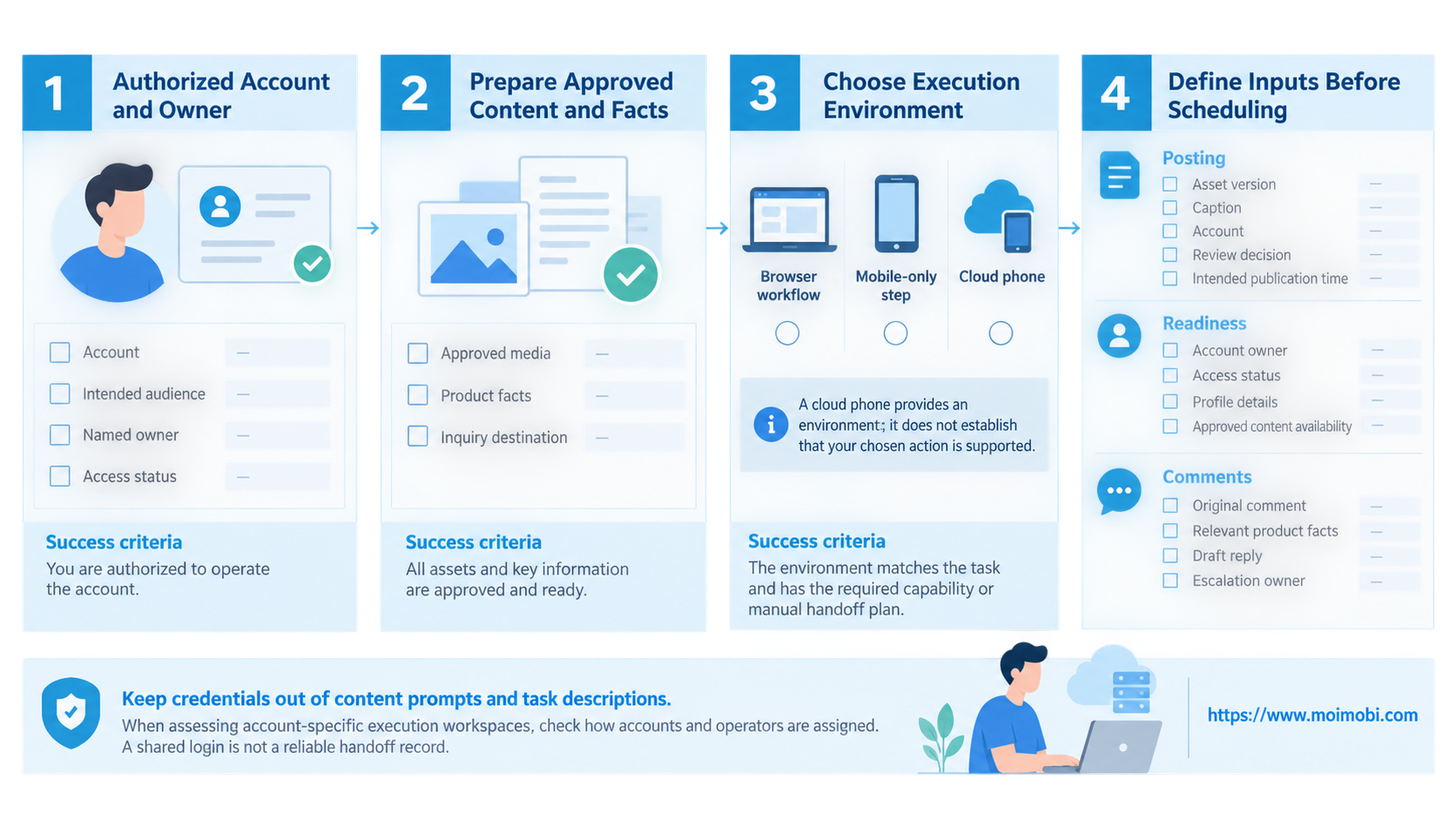
Start with an account you are authorized to operate, its intended audience and a named owner. Prepare approved media, product facts and a destination for genuine inquiries. A reply model needs verified answers, not permission to invent prices or delivery promises.
Choose the execution environment by the task. A browser workflow may handle a web publishing interface. A mobile-only step needs a verified mobile capability or a manual handoff. A cloud phone provides an environment; it does not establish that your chosen action is supported.
Write down these inputs before scheduling:
- Posting: asset version, caption, account, review decision and intended publication time.
- Readiness: account owner, access status, profile details and approved content availability.
- Comments: original comment, relevant product facts, draft reply and escalation owner.
Keep credentials out of content prompts and task descriptions. When assessing account-specific execution workspaces, check how accounts and operators are assigned. A shared login is not a reliable handoff record.
Define warm-up before choosing automation
Readiness means confirming that the account represents the right business and can perform the intended task. Check access, profile accuracy and the availability of an approved publishing route. Record missing inputs as blocked tasks rather than attempting more activity.
An activity quota is not a readiness check. TikTok's Integrity and Authenticity guidelines identify repetitive automated content as spam and prohibit bot-written fake comments or engagement inflation. A routine intended to create artificial popularity is outside this guide.
For a new business account, the practical output is a readiness record. It should show who owns the account, which content is approved and what remains unresolved. There is no universal activity schedule here, and no claim that completing these checks changes enforcement outcomes.
If you are evaluating a TikTok automation tool, ask which authorized tasks it supports and how results are verified. Compare those answers with your TikTok publishing and account requirements, rather than treating a tool label as permission to automate everything.
Run an AI posting workflow in a checked sequence
Use one approved item to test the path before adding a queue. Keep preparation, execution and verification as distinct stages.
- Create the job. Identify the account, source asset and task type. Add an internal reference that remains the same during recovery. Check that the destination matches the approved item.
- Prepare the text. Ask AI to draft from supplied facts and the specific audience question. Review claims, links and tone. Save the approved version separately from the model's first output.
- Confirm readiness. Check access and the selected publishing route. Missing media, expired access or an unresolved review sends the job back to its owner. None of those states counts as ready.
- Execute the approved action. Use a supported integration or reviewed manual step. For TikTok posting automation, confirm the selected account and media before submission. A retry must retain the approved content.
- Verify and close. Find the actual published item or reply and compare it with the approval. Store its identifier or URL where available. If the result is uncertain, investigate before another submission.
For browser implementation, Playwright's actionability documentation explains checks for visibility, stability and an enabled target before clicks. Those checks concern whether an action can be performed. Separately verify publication; a clickable button is not evidence that a post exists.
Validation checks for posts and comment replies
Posting needs an outcome check: the intended account, correct media and approved caption are present. For TikTok video publishing automation, distinguish upload completion from the final publication result. Inspect the published item instead of counting an upload event as success.
Comment handling has a different test. The reply must answer the original question using current product facts. A generic promotional sentence may be grammatically correct yet fail the task.
Consider a customer asking whether a product fits a particular device. This illustrative example needs the device detail and a verified compatibility reference. If either is missing, route the question to a person. A similar product name does not establish compatibility.
Before enabling automatic replies, inspect drafts for:
- Answers supported by the supplied facts.
- Questions that need clarification rather than a sales pitch.
- Complaints, payment issues or commitments needing a named reviewer.
- Duplicate processing of the same comment.
NIST's AI RMF Core emphasizes documented responsibilities and human-AI oversight. Apply that principle by naming the reviewer and escalation path. This is an operational use of a voluntary framework, not a compliance certification.
Errors and limits: stop uncertain retries
Treat recovery as a decision, not a loop that always repeats the action. The same error message can occur before submission or after publication. Those situations require different next steps.
| Observed state | Suggested response | Evidence needed to resume |
|---|---|---|
| Access expired before submission | Pause and ask the owner to restore access | Account and destination confirmed |
| Asset or caption differs from approval | Return to content review | Correct approved version |
| Submission ends without a clear result | Inspect the destination before retrying | Published item found, or absence established |
| Reply requires missing product facts | Assign the comment to a person | Verified answer and review decision |
The uncertain state matters most. Repeating a submission without checking can create a duplicate. Keep the original reference, record what was observed and preserve the approved content. Resume only when the owner can explain the next action.
Moimobi connects AI with browser and mobile execution environments. Confirm the capabilities in your deployed version before designing a full chain. Browser workflow support does not establish equivalent mobile workflow support. Use a manual step for an unconfirmed capability instead of describing it as a released feature.
Evaluate the broader social content execution workflow by its handoffs and outcomes. More accounts or device capacity cannot resolve missing approvals, unclear replies or unverified publication.
Frequently asked questions
Can AI publish without a person reviewing every post?
That depends on the supported route and your approval design. Begin with reviewed content. Keep new claims, changed offers and uncertain outputs under human review until you can explain their handling.
Does warm-up require automated likes or follows?
No. Here it means access, profile and content readiness. Artificial engagement is not a prerequisite for the workflow described here.
Should one workflow handle posting and all comments?
Keep separate task types. Posting uses an approved asset; replies depend on a particular incoming question. Sharing account context is useful, but their completion checks differ.
What should happen when a publication times out?
Inspect the destination first. Preserve an uncertain state if you cannot establish the result. A local timeout alone is not grounds to mark the task failed and resubmit.
Can a mobile task reuse a browser workflow unchanged?
Not without verification. Check the available controls and result evidence in each environment. Keep a manual handoff when the required mobile action has not been verified.
What belongs in the execution record?
Record the account, task reference, approved input, reviewer, observed result and recovery decision. Include the published identifier where available. Avoid storing unrelated customer information.
How should a team judge whether automation is worthwhile?
Compare review effort, unresolved tasks and duplicate handling with the previous process. Count verified outcomes, not clicks. Make the decision using your own operating records, not an assumed efficiency gain.
Next step: validate one complete task
Choose one approved post and one incoming comment. Write their inputs, owners and completion checks. Test how each moves through preparation, execution and verification, including an uncertain result.
Expand only after the team can distinguish a completed action from a pending review or unknown outcome. That separation makes AI social media workflows explainable without turning readiness into artificial engagement or treating a model draft as permission to publish.