
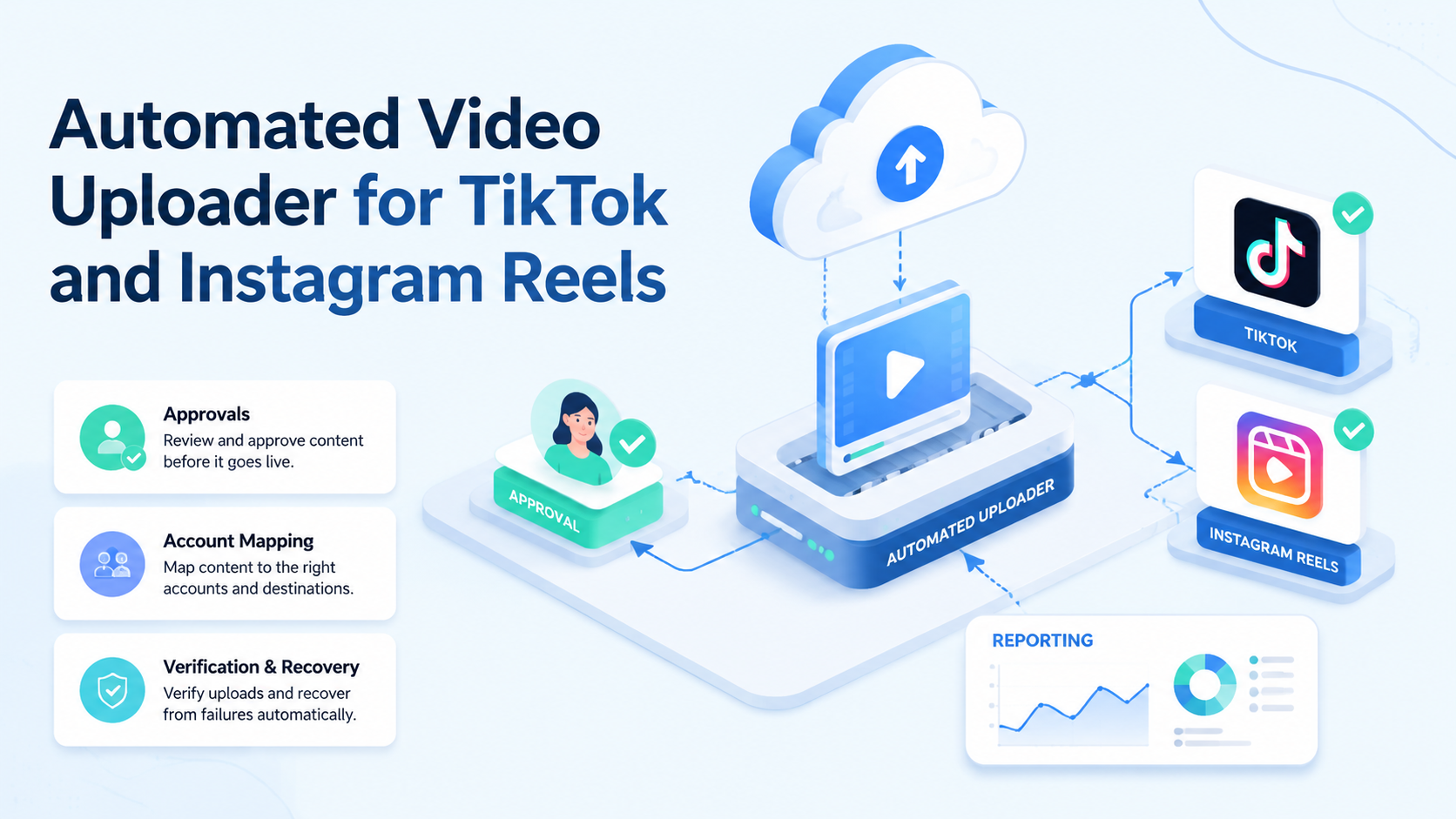
An automated video uploader is software that helps teams prepare, route, publish, and verify short-form video uploads. For TikTok and Instagram Reels, the real requirement is not only sending a file. Teams need account mapping, caption review, media checks, publishing state, and recovery notes.
A simple uploader may work for one creator. A team workflow is different. Agencies, e-commerce teams, and regional brand teams need content approvals, account-specific environments, and post-publish monitoring.
Moimobi places video uploading inside an execution system. A team can connect mobile automation, browser workflows, multi-account management, and cloud phone environments.
Key Takeaways
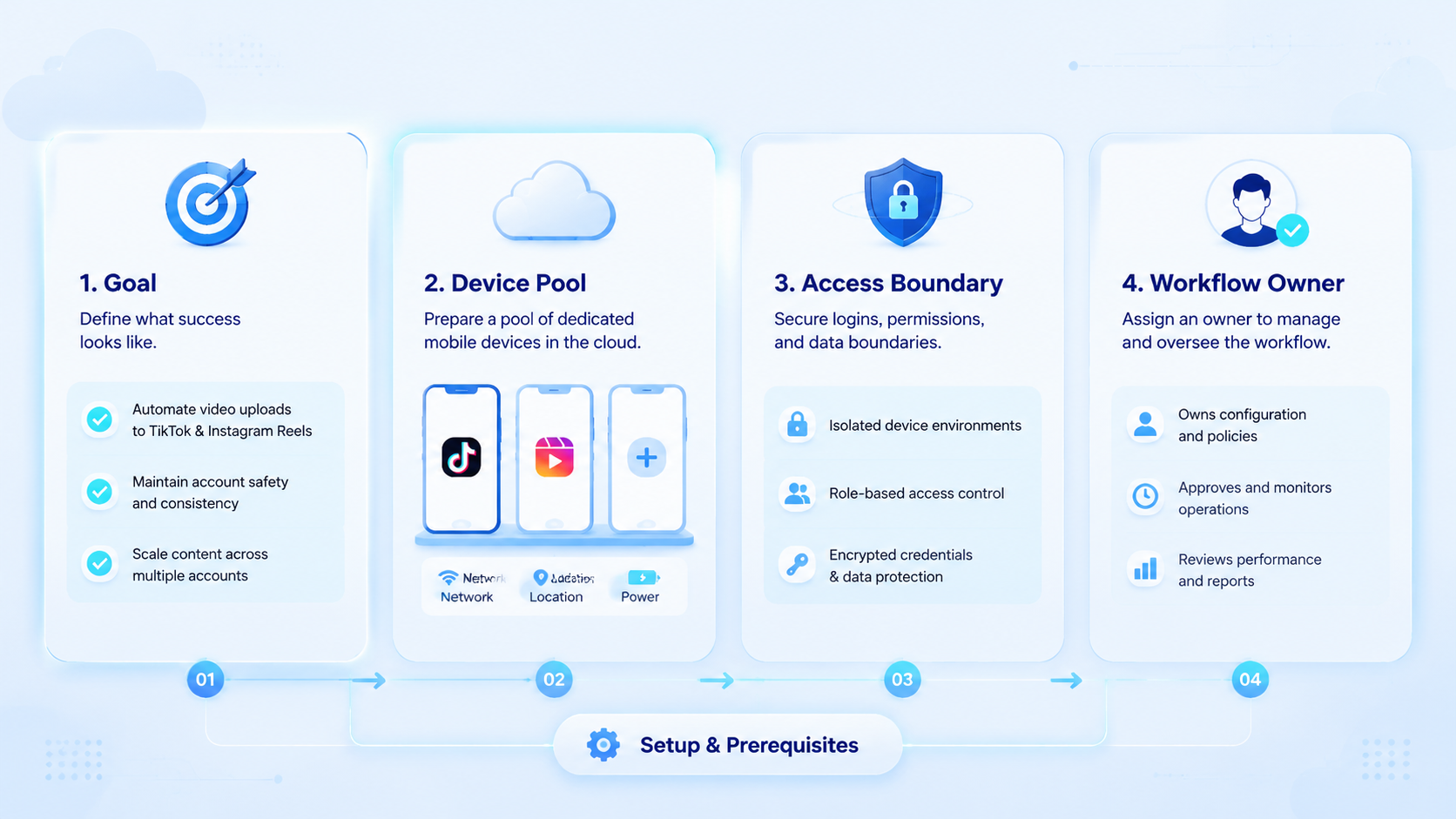
- An automated video uploader should manage readiness, execution, and verification.
- TikTok and Instagram Reels workflows need platform-specific checks.
- Teams should separate content approval from upload execution.
- Start with one account group before scaling video publishing automation.
What Is an Automated Video Uploader for TikTok and Instagram Reels?
For team operations, the uploader is a workflow tool for moving approved video assets into publishing steps. It may handle file selection, caption fields, account assignment, publish timing, and status checks.
Platform paths differ. TikTok documents official upload and direct-post concepts in its Content Posting API. Instagram documents content publishing through Meta developer resources such as Content Publishing.
Those official paths are useful, but they are not the whole workflow. A team also needs content readiness, brand approval, account ownership, and error handling.
A good uploader should answer:
- Which video asset is approved?
- Which account will publish it?
- Which caption and hashtags are approved?
- Which environment will execute the upload?
- What should happen if the upload fails?
- Who checks whether the post is live?
This makes the uploader part of a publishing workflow, not only a file transfer tool.
Why Automated Video Uploading Matters
Short-form video campaigns create many small tasks. A campaign may need different cuts, captions, thumbnails, and publish windows for TikTok and Instagram Reels.
Manual uploading can work at low volume. It becomes fragile when several operators handle many accounts. The common failure is not only forgetting to post. It is posting the wrong version, using the wrong account, missing a prompt, or failing to verify the live post.
TikTok's API documentation also shows why teams should avoid assuming one universal path. Upload, direct post, permissions, and status can be platform-specific. Instagram's publishing docs also reflect platform-specific requirements.
For mobile-first workflows, a cloud phone may be part of the execution path. For browser dashboards or asset planning, a browser workspace may be enough. The workflow should know the route before it runs.
Key Benefits and Use Cases
The first benefit is consistency. Every video passes through the same readiness checks before upload.
The second benefit is handoff. A content editor can approve assets. An operator can execute the upload. A manager can review the result. The workflow record connects those roles.
The third benefit is recovery. If a task fails, the team can see the account, file, step, error, owner, and next action.
| Use case | Uploader role | Human checkpoint |
|---|---|---|
| Campaign launch | Queue approved videos | Confirm account and caption |
| Regional publishing | Route versions by account | Check language and timing |
| Creator agency work | Separate client assets | Approve client-specific content |
| E-commerce launch | Publish product clips | Verify links and claims |
| Post-live monitoring | Check published state | Review comments and DMs |
Teams that publish often should connect uploading with social media marketing. Publishing is the start of engagement, not the end of the job.
How to Get Started with an Automated Video Uploader
Start with a narrow campaign. Choose one platform, one account group, and one video format. Do not begin with every channel at once.
Use this setup path:
- Create asset rules. Define file format, naming, caption, thumbnail, and approval needs.
- Map accounts. Assign each account to an owner and workspace.
- Choose execution path. Decide whether upload uses API, browser, cloud phone, or manual review.
- Add approval gates. Separate draft, approved, scheduled, uploaded, live, failed, and repaired.
- Log results. Record upload status, failure reason, and next action.
- Monitor after publish. Assign comment and DM checks after the video is live.
For multi-account teams, device isolation helps keep execution workspaces clearer. The same video campaign may touch many accounts, but each account should still have its own lane.
Common Mistakes to Avoid
Do not treat uploading as the whole workflow. The dangerous parts often happen before and after the upload.
Avoid these patterns:
- uploading before final caption approval;
- using one asset version for every platform;
- mixing account workspaces;
- ignoring failed upload reasons;
- skipping live-state verification;
- not assigning comment monitoring;
- measuring only upload count.
Another mistake is overbuilding too early. A complex uploader may look impressive but fail daily use if operators cannot understand the task state. Start with fewer states and better records.
Teams should also avoid workflows that push low-quality repetitive content or fake engagement. A controlled upload workflow should support legitimate publishing, review, and monitoring work.
Who It Fits and When It Is a Strong Match
An uploader workflow fits teams with recurring video publishing. It is less useful for one creator who manually posts one or two videos a week.
Strong fit
- Agencies publishing videos for many clients.
- E-commerce teams launching product short videos.
- Creator teams splitting one campaign across platforms.
- Cross-border teams managing regional accounts.
Weak fit
- Single-account manual publishing.
- Teams without content approval rules.
- Workflows without post-publish monitoring.
- Campaigns where every post needs custom human judgment.
The strongest match is a team that already has content volume but lacks execution control. The system should make the process clearer, not only faster.
Pilot Rollout and Recovery Checks
Run a pilot before connecting many accounts. A good pilot uses five to ten posts and one account group.
Measure:
- approved videos before upload time;
- successful upload rate;
- failed upload reasons;
- live-post verification completion;
- wrong-account incidents;
- manual repair time;
- comment monitoring completion.
Recovery checks decide whether the workflow is ready. A failed upload should show the account, asset, caption state, environment, owner, and next action. If the team cannot explain a failure, do not scale the system yet.
After the pilot, update asset naming, approval rules, and account mapping. Then add more accounts or platforms gradually.
Automated Video Uploader Readiness Checklist
A video should not enter the upload queue just because the file exists. It should pass a readiness check first.
Use this checklist:
- final video file approved;
- correct aspect ratio and length for the platform plan;
- caption approved;
- hashtags reviewed;
- thumbnail or cover selected when needed;
- account assigned;
- workspace assigned;
- publish time approved;
- fallback owner named;
- post-live monitoring assigned.
This checklist prevents common mistakes. A video can be technically ready but commercially wrong. The caption may be unapproved. The product claim may need review. The account may belong to the wrong region.
For teams handling many videos, readiness should be a visible state. Use draft, ready for review, approved, queued, uploading, live, failed, repaired, and archived. The uploader should not skip those states just to move faster.
TikTok and Instagram Reels Workflow Differences
TikTok and Instagram Reels should not be treated as identical upload targets. The same creative may work across both platforms, but the workflow around it can differ.
TikTok workflows may include mobile app checks, creator account routines, caption review, and post-status verification. Instagram Reels workflows may include account-level content planning, comment follow-up, and brand profile review.
Store platform-specific fields in the upload record:
| Field | Why it matters |
|---|---|
| Platform version | One edit may not fit both platforms. |
| Caption variant | Hooks and descriptions may differ. |
| Account owner | Each account needs an accountable operator. |
| Execution path | API, browser, mobile app, or manual review may differ. |
| Verification step | The team needs proof that the post is live. |
This structure keeps teams from treating the upload as a black box. Operators can see what is planned, what ran, and what needs repair.
What Happens After Upload
The upload is not the final business outcome. The post still needs verification, monitoring, and follow-up.
After upload, assign these tasks:
- Confirm whether the video is live.
- Check caption, cover, and account.
- Record the live URL or evidence.
- Monitor early comments.
- Route questions or complaints.
- Record failed or delayed tasks.
- Update campaign reporting.
This post-upload layer is where many teams lose value. A video may go live, but comments may be ignored. A failed upload may be retried without a reason. A regional account may publish late with no note.
An automated uploader should therefore connect to reporting and reply workflows. Publishing is one step in social operations. The useful system keeps the next steps visible.
Team Roles Around Video Upload Automation
Video publishing works better when roles are explicit. One person should not silently own every step from asset approval to comment review.
Use a simple role split:
- Content owner: approves the final video, caption, thumbnail, and campaign note.
- Account owner: confirms the target account and workspace.
- Execution owner: runs or supervises the upload task.
- Review owner: checks the live post and records issues.
- Engagement owner: monitors early comments and DMs.
Small teams may combine roles, but the workflow should still name the responsibility. A single operator can wear several hats. The task record should still show which responsibility is being handled.
This role split reduces confusion during campaign days. If an upload fails, the team knows who checks the asset, who checks the account, and who repairs the execution step.
Frequently Asked Questions
What is an automated video uploader?
It is software that helps prepare, publish, verify, and track video upload workflows.
Does it replace a social media scheduler?
No. A scheduler manages timing. An uploader manages execution and upload state.
Can it upload to TikTok and Instagram Reels?
It can support those workflows when platform requirements, permissions, and review steps are handled.
What should teams automate first?
Start with asset readiness checks, account mapping, upload status, and post-live verification.
Why use cloud phones?
Cloud phones help when the workflow depends on mobile app state or app-side checks.
What is the main risk?
The main risk is uploading the wrong asset, caption, account, or version without review.
How should teams measure success?
Measure completed uploads, failed-task repair time, live verification, and monitoring completion.
Conclusion
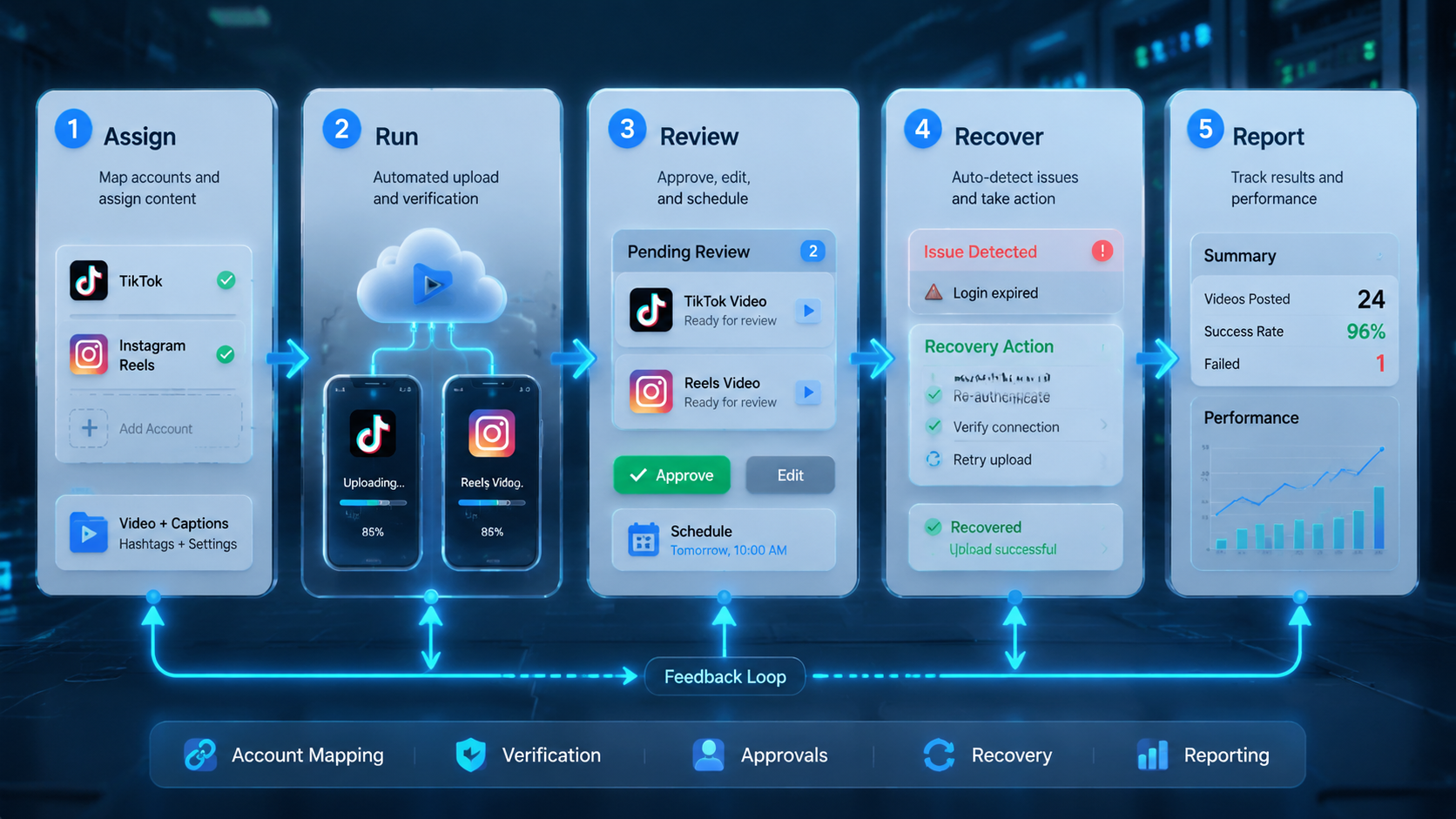
The highest value comes from controlling the full publishing workflow. The team should know which video is approved, which account owns it, which environment executes it, and how failures are repaired.
Start small. Test one campaign, one account group, and one platform path. Expand only after upload results and recovery records are clear.



