

The best Instagram automation tool is the one that fits the creator or agency workflow without mixing accounts, approvals, mobile tasks, and reporting. A creator may need content planning and publishing support. An agency needs account separation, client-level control, repeatable execution, and clear handoff between content, review, and operations.
Instagram automation should not be judged only by how many actions it can perform. The better question is whether the tool supports the way a team actually works. That includes post preparation, account ownership, device or browser environment, review rules, and status tracking.
Moimobi is built for the execution side of that problem. Teams can use multi-account management, device isolation, mobile automation, and cloud phone environments to run account workflows with clearer boundaries.
Key takeaways
- Creators and agencies need different Instagram automation setups.
- Account isolation matters once several clients, brands, or operators are involved.
- Browser profiles help web-based account work; mobile environments help app-first workflows.
- Official platform APIs are useful where permissions and account types support them.
- Review gates matter for captions, comments, DMs, and brand-sensitive posts.
- A small pilot should measure outcomes before any wider rollout.
How to Evaluate a Best Instagram Automation Tool
Start with the operating risk, not the feature page. Instagram workflows often involve client accounts, campaign assets, captions, approvals, comments, and inbox work. A tool that handles only one action may still leave the team with messy handoffs.
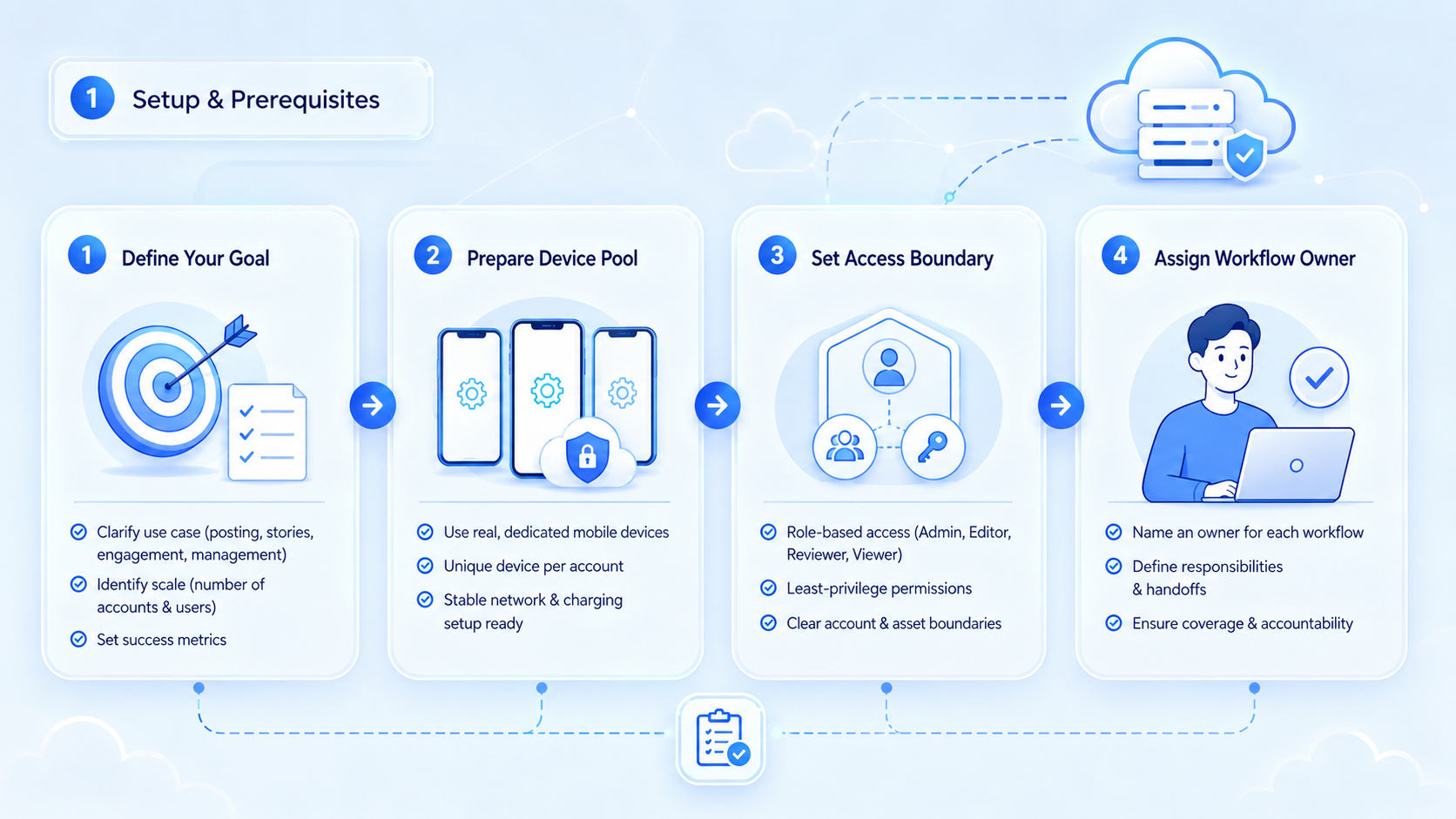
Use this evaluation path:
-
Map the workflow.
Define whether the team needs scheduling, posting, inbox triage, comment review, content research, or reporting. -
Group accounts by owner.
Separate creator, brand, client, and regional accounts. -
Choose the environment.
Browser profiles fit web dashboards. Mobile environments fit app-first checks and account tasks. -
Check official support.
Meta's Instagram Platform documentation explains API-based capabilities and account requirements. Use official routes where they fit. -
Add human review.
Captions, product claims, DMs, and comments should have different review rules. -
Require useful logs.
Every run should show account, task, environment, reviewer, result, and failure reason.
This order keeps the decision grounded. A creator with one account should not buy a heavy operations system. An agency with thirty accounts should not run everything from one shared login flow.
The Capabilities That Actually Change Outcomes in a best Instagram automation tool
The best Instagram automation tool for a creator is usually different from the best tool for an agency. Creators need speed and content flow. Agencies need control, separation, and repeatable delivery.
Official sources define part of the operating boundary. Meta documents the Instagram Platform for business and creator use cases, while platform permission models shape which actions can be automated through approved integrations.
Browser automation has its own structure. The W3C WebDriver standard defines a common browser automation model. Playwright also documents browser contexts as isolated browser sessions. Those concepts are useful when teams operate logged-in dashboards across multiple accounts.
Mobile operations add another path. AWS Device Farm describes hosted real-device app testing, which shows why mobile app workflows often need managed device environments. For Instagram teams, cloud phone workspaces can support app-first checks and task execution that do not belong in a generic desktop browser.
What the best Instagram automation tool should report
Reporting should explain workflow health, not only post count. A creator needs to know whether content shipped on time. An agency needs to know which account, client, reviewer, and environment produced each result.
Useful reporting starts with simple fields. Track account, client, asset, caption version, reviewer, execution method, status, failure reason, and follow-up owner. These fields let the team review work without searching chat threads.
Agency reporting also needs separation. Client A should not be mixed with Client B. A regional brand account should not share the same operational history as a test account. Clear records protect delivery quality and reduce confusion during handoff.
Moimobi is relevant when reports need to connect to real execution environments. A post is not only a content item. It is the outcome of an account, device or browser workspace, reviewer, and task run.
Selection Matrix for Creators and Agencies
| Team type | Main need | Best-fit capability |
|---|---|---|
| Solo creator | Plan and publish faster | Lightweight scheduling, caption support |
| Creator team | Coordinate assets and approvals | Shared workflow, draft review, content status |
| Small agency | Separate client accounts | Browser profiles, account roles, activity logs |
| Growth agency | Run repeated tasks across accounts | Mobile automation, workflow queues, reporting |
| Cross-border seller | Manage social and customer touchpoints | Mobile environments, routing control, multi-platform work |
The matrix helps avoid overbuying and underbuying. A creator does not need enterprise-level account infrastructure on day one. A growing agency should not wait until client accounts are already tangled.
Moimobi is a better fit when the team needs execution environments, not only a content calendar. It can support Instagram alongside TikTok, WhatsApp, and other social media marketing workflows.
Adoption Cost, Setup Friction, and Team Fit
The real cost of Instagram automation includes setup time, training, review rules, environment management, and support work. A cheap tool can become expensive if the team spends hours fixing failed runs.
A single creator can keep the system light. The first goal is consistent publishing and content reuse. Add more controls only when account count or team size grows.
Agencies should formalize ownership earlier. Each client account needs a workspace, login owner, reviewer, content source, and recovery path. Shared workarounds become harder to audit once more people join the process.
Moimobi fits teams that already understand their workflows. If a team cannot describe its posting, comment, and inbox process, it should document those steps before adding automation.
Solo operators should also watch for hidden complexity. A tool with too many controls can slow one-person publishing. Simple scheduling and caption support may be enough until assistants, brand partners, or multiple accounts enter the workflow.
Agencies face the opposite risk. A lightweight creator tool may feel easy during setup, then fail when account count grows. The stronger fit is usually a system that treats each client account as a managed workspace with its own state, owner, and history.
Which Option Fits Different Operating Scenarios
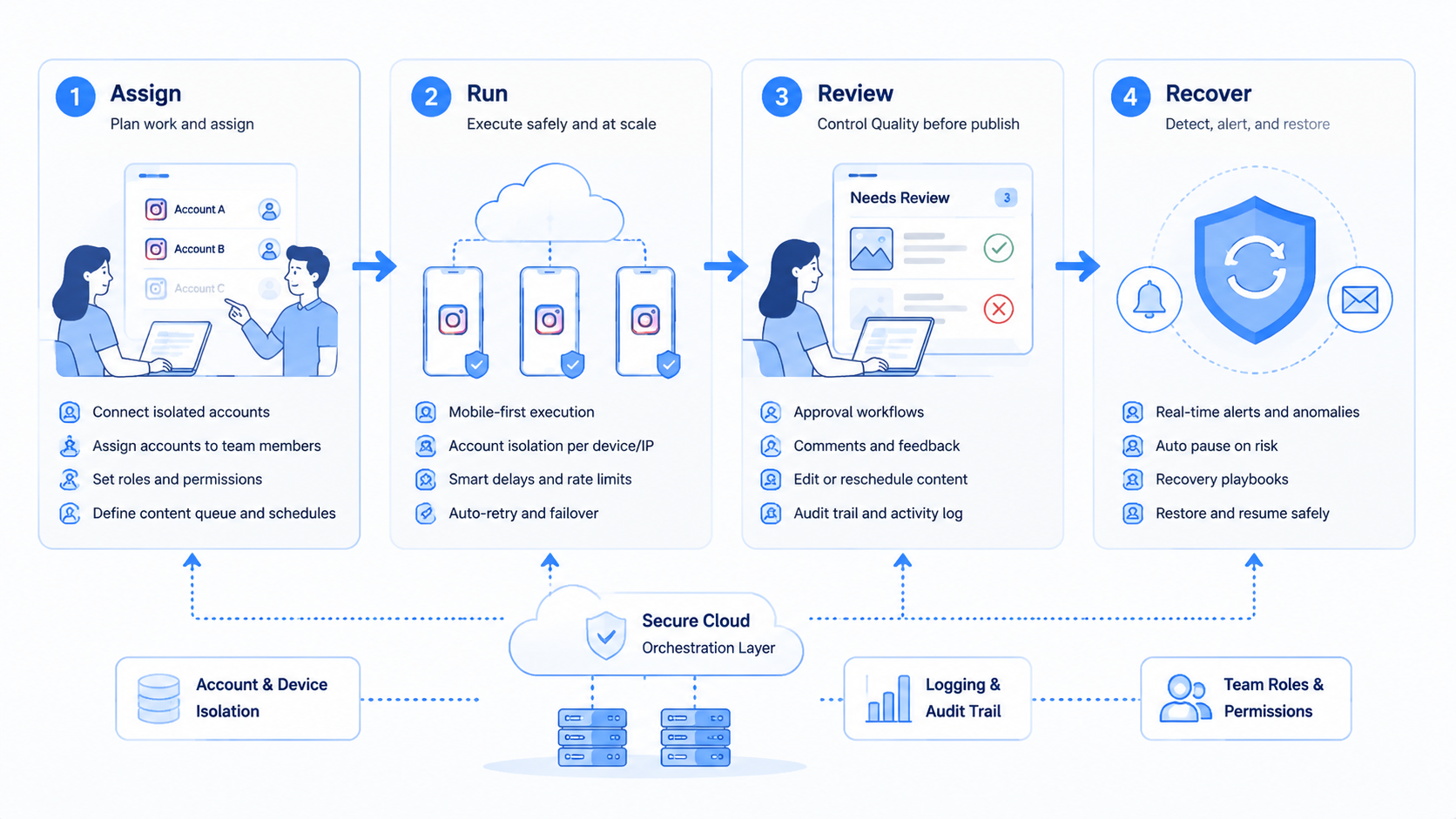
Choose by scenario, not by headline claim.
Content-only creator: Use a scheduler, caption tool, and asset library. Keep infrastructure simple.
Creator team with assistants: Add approval status, role boundaries, and posting logs.
Agency with client accounts: Use separate browser or mobile workspaces for each account group. Keep client environments distinct.
Social commerce team: Add mobile execution for app checks, comments, and customer engagement workflows.
Operations team: Use a broader execution platform with task queues, environment control, and reporting.
Teams evaluating an anti-detect browser alternative for social media should be careful with wording and intent. The operational goal should be account separation and controlled workspaces, not reckless evasion claims.
What Not to Automate Too Early
Some Instagram actions need more review than others. Posting approved assets is lower risk than replying to customers or changing profile details.
Avoid automating these workflows before rules are mature:
- Complaint replies.
- DMs involving pricing, refunds, or support promises.
- Brand partnership claims.
- Product claims that need legal review.
- Account setting changes.
- High-volume engagement actions with no human oversight.
Build from low-risk repeatable work first. Publishing status checks, asset routing, draft review, and account reporting are safer starting points than open-ended customer conversations.
Pilot Rollout, Measurement, and Recovery Checks
A pilot should prove that the workflow is understandable. Use a small account group, a narrow content format, and one review path.
Measure these fields:
- Time from approved asset to published post.
- Number of manual corrections.
- Failed task reasons.
- Reviewer delay.
- Account environment issues.
- Post-run reporting completeness.
Recovery matters as much as success. A failed post should create a clear next action. A missing caption should return to content review. A session issue should route to the account owner. A customer-facing reply should pause until a reviewer clears it.
After the pilot, scale only the parts that produced clear data. Do not expand workflows that still depend on chat messages and memory.
Decision rules before choosing a best Instagram automation tool
Use a short decision rule before buying. Choose a content tool when the bottleneck is ideas, captions, or publishing discipline. Choose an operations tool when the bottleneck is account switching, client separation, mobile work, or failed handoff.
The second rule is about ownership. Every Instagram account should have a named owner, a reviewer, and a workspace. Without those three items, automation can make responsibility less clear. With them, task history becomes easier to read.
The third rule is about channel scope. Instagram rarely exists alone inside an agency. TikTok, WhatsApp, Facebook, and marketplace workflows may sit beside it. A narrow Instagram-only tool may work for a creator, but an agency may need shared infrastructure across platforms.
Moimobi fits the broader case. It does not replace creative judgment. It gives teams a controlled way to run the browser and mobile parts of the workflow after the creative decision is made.
One final rule is about failure review. Do not judge the platform only on successful posts. Look at failed tasks and ask whether the reason is visible, whether the owner is clear, and whether the next action is obvious.
Frequently Asked Questions
What is the best Instagram automation tool for creators?
Start with content planning, scheduling, caption help, and simple reporting. Heavy infrastructure may be unnecessary at one account.
What is the best Instagram automation tool for agencies?
Agencies should prioritize account separation, role control, review queues, run history, and client-level reporting.
Do Instagram teams need mobile automation?
Not for every task. Mobile automation matters when the workflow depends on app behavior or mobile account checks.
Is a fingerprint browser enough?
It can support web workflows. It may not cover app-first Instagram tasks that need mobile execution.
Can AI handle Instagram replies?
AI can draft replies, but customer-facing messages need review rules and escalation paths.
What should a pilot include?
A pilot should include account setup, one content workflow, approval, execution, status tracking, and recovery.
How does Moimobi help?
Moimobi provides controlled browser and mobile environments for teams running repeated Instagram and multi-account workflows.
Conclusion
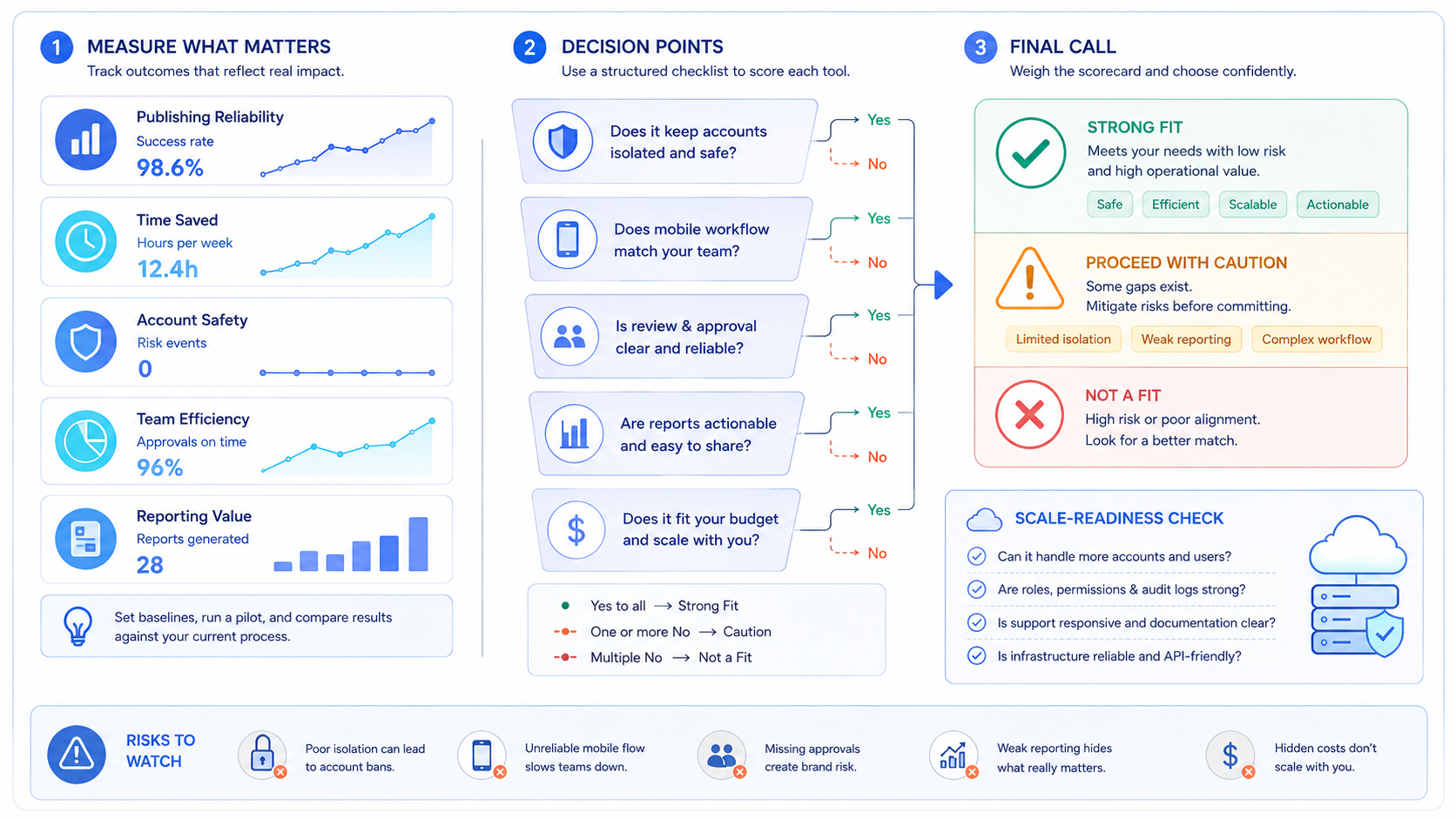
The best Instagram automation tool depends on team shape. Creator-led teams need to protect content flow. Agencies need to protect client separation, review control, and execution history.
Before choosing a platform, map the workflow and account structure. Then test one small pilot with clear success and failure tracking. When Instagram work requires both browser and mobile execution, Moimobi can provide the environment layer that keeps account workflows more controlled.



