
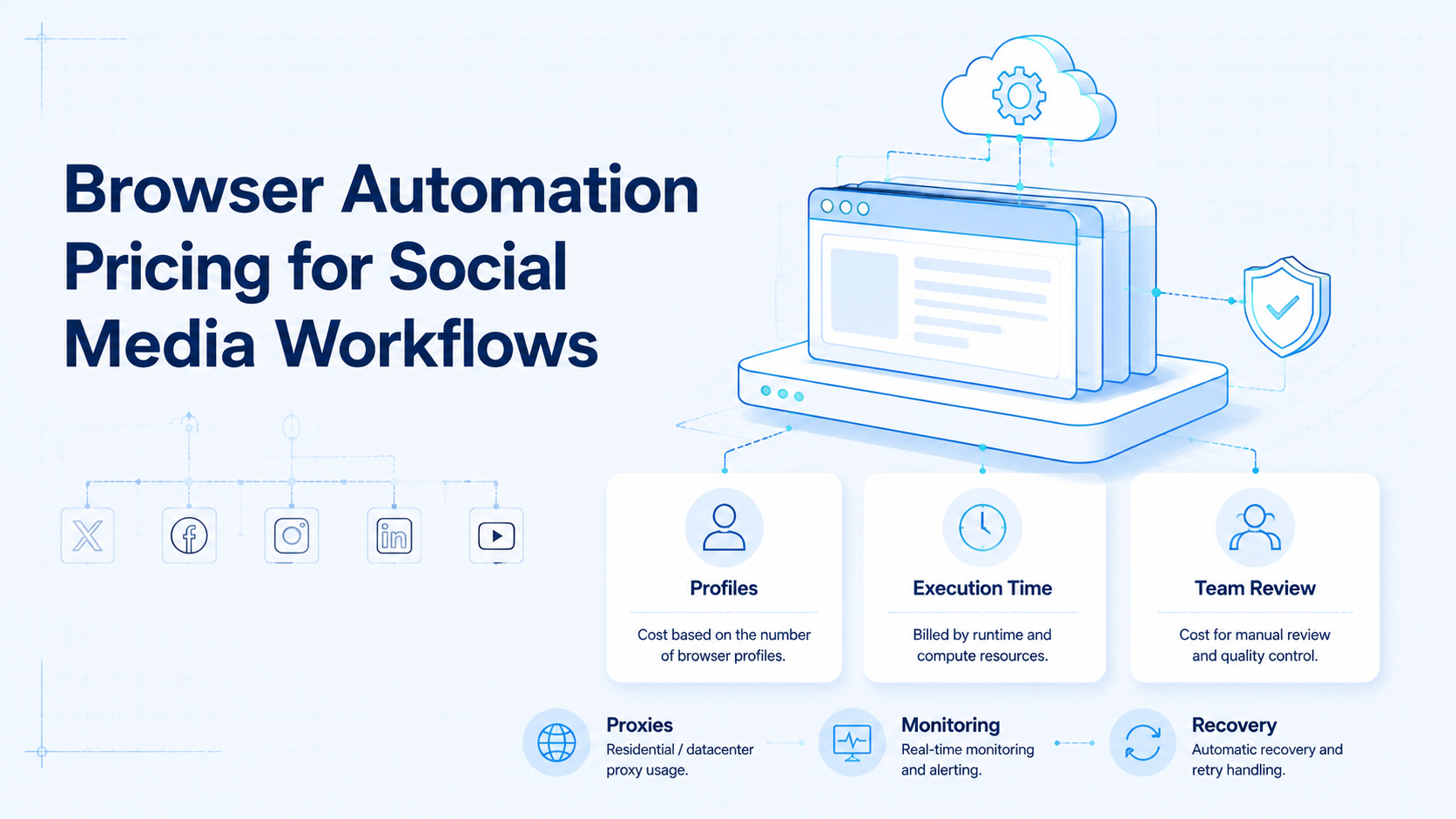
Browser automation pricing is the cost model for running browser-based tasks, sessions, profiles, proxies, monitoring, and recovery work. For social media teams, the real price is not only the subscription fee. It is the total cost of keeping account workflows separated, reviewed, and repairable.
A cheap browser tool can become expensive if operators spend hours fixing login issues, wrong-profile work, failed posts, or missing logs. A higher monthly plan can still be weak if it does not support account ownership and team handoff.
Moimobi treats browser automation as one layer inside an execution stack. Browser work should connect with multi-account management, mobile execution, device isolation, and recovery records.
Key Takeaways
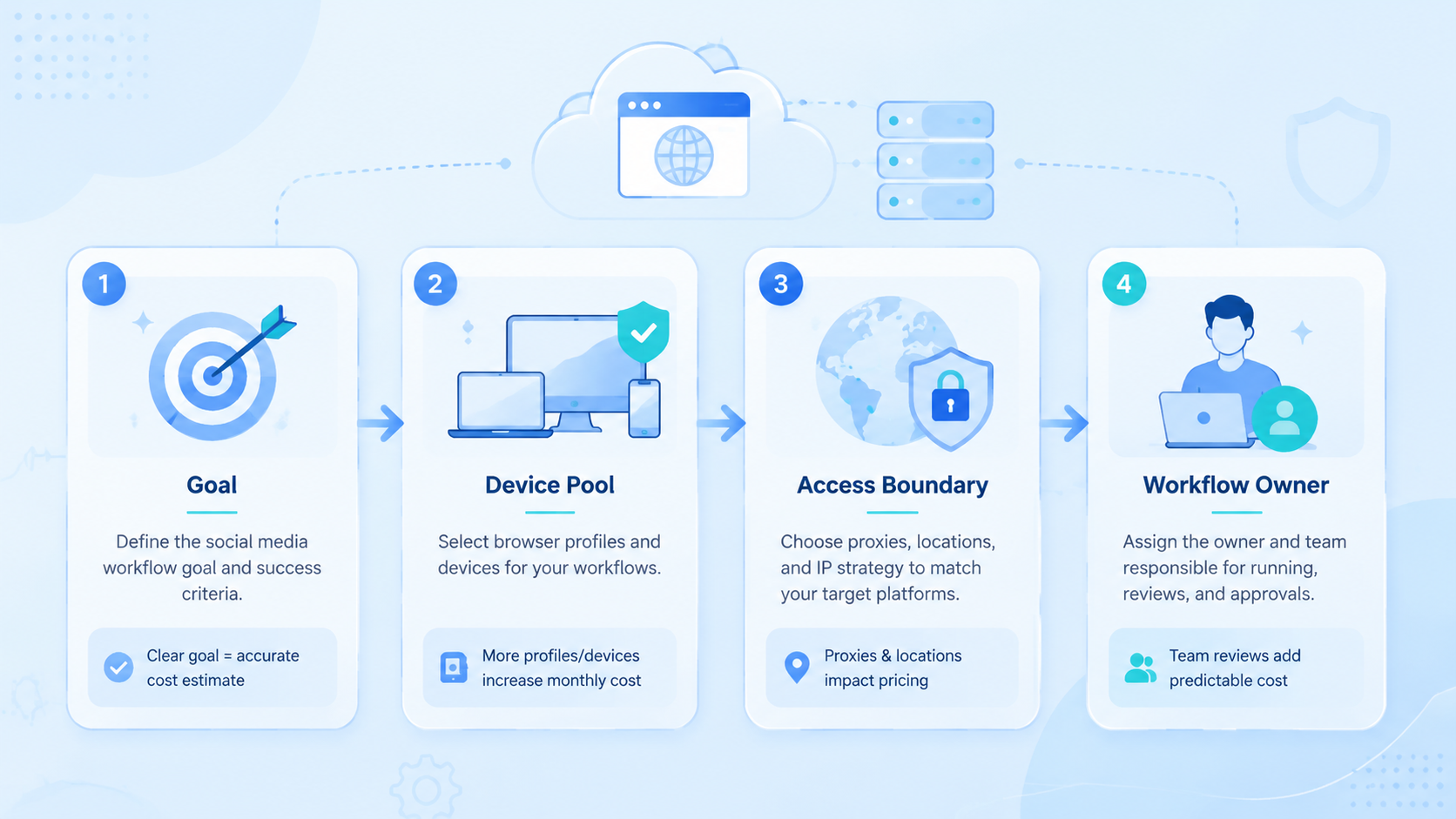
- Browser automation pricing should be evaluated by workflow cost, not plan price alone.
- Social media teams should include profiles, proxies, operators, retries, logs, and review time.
- Browser automation fits dashboards, inboxes, reporting, and account management tasks.
- A pricing pilot should measure completed tasks, repair time, and wrong-profile incidents.
What Is Browser Automation Pricing for Social Media Workflows?
For social media operations, the pricing model combines browser sessions and workflow controls. It may include seats, browser profiles, cloud browser time, proxy usage, API calls, storage, screenshots, logs, and support.
The technical category has formal roots. W3C defines WebDriver as a remote-control interface for browser user agents. Playwright documents browser contexts as isolated environments with separate cookies and local storage.
Those references do not tell you what to buy. They explain why pricing should account for sessions and isolation. Social media teams rarely need one browser session. They need account-specific workspaces that keep cookies, storage, routing, and task history separated.
A practical cost model has five parts:
| Cost area | What to include |
|---|---|
| Platform plan | Seats, profiles, limits, support tier |
| Infrastructure | Proxy routing, cloud browser time, storage |
| Operations | Operator time, review time, handoff notes |
| Recovery | Retries, login prompts, failed-task repair |
| Governance | Logs, approvals, account mapping, reporting |
The plan fee is only the visible part.
Why Browser Automation Pricing Matters
Pricing matters because social workflows are repetitive and account-specific. A tool that looks affordable for one account may not scale across 20 accounts, five operators, and daily review cycles.
The first pricing mistake is counting only profiles. Profiles matter, but they are not the workflow. A team also needs owners, routing rules, task states, and logs.
The second pricing mistake is ignoring recovery. Browser automation can fail for normal reasons: changed page layouts, prompts, expired sessions, missing approvals, or wrong account context. Every failure creates labor.
Meta's Inauthentic Behavior policy is also a boundary. Teams should not price tools around deceptive engagement patterns. A serious workflow should support legitimate account operations, customer response, publishing checks, and reporting.
For social teams, browser automation cost should answer one question: how much does it cost to complete a controlled workflow, not just launch a browser?
Key Benefits and Use Cases
The best use cases are browser-native. Social dashboards, reporting exports, inbox review, scheduling tools, ad dashboards, analytics pages, and client portals often fit browser execution.
Pricing becomes easier when you group tasks:
- Daily account checks: log in, review status, capture notes.
- Inbox triage: collect messages or comments for review.
- Publishing support: check assets, dashboard status, or scheduled content.
- Reporting: export data, capture screenshots, update summaries.
- Client operations: separate accounts by brand, region, or client.
Browser automation becomes more valuable when it connects to social media marketing. A reporting task is not only a browser click. It is part of campaign review.
Mobile-first work needs a separate cost line. If the task depends on an app environment, pair the browser workflow with mobile automation or a cloud phone. Do not force every task into the browser just because the browser plan is cheaper.
How to Get Started with Browser Automation Pricing
Start with a workflow inventory, not a vendor list. Count what the team actually runs each week.
Use this checkpoint model:
- Accounts: list accounts by platform, owner, and risk level.
- Tasks: separate dashboard, inbox, publishing, monitoring, and reporting tasks.
- Frequency: count daily, weekly, and campaign-based runs.
- Environment: mark browser-only, mobile-only, and mixed workflows.
- Recovery: estimate how often tasks need repair.
- Review: identify tasks that require human approval.
- Evidence: decide what logs, screenshots, or exports matter.
Then compare pricing by completed workflow. A plan with low profile cost may still be expensive if it lacks logs or handoff controls. A plan with automation minutes may be hard to predict if tasks pause often.
Use Moimobi's device isolation page when pricing workflows that cross browser and mobile environments. Account separation is part of the cost model.
Common Mistakes to Avoid
Do not buy browser automation only by profile count. A profile without ownership, task state, or recovery notes is just another container.
Avoid these pricing mistakes:
- comparing monthly fees without operator time;
- ignoring proxy and network routing costs;
- using one profile for unrelated accounts;
- not counting failed-task repair;
- treating mobile app work as browser work;
- missing screenshot, log, and audit needs;
- scaling before one workflow is reliable.
Another mistake is using automation to hide weak processes. If a team does not know who owns each account, automation will not solve the issue. It may only make the confusion faster.
For comparison topics such as BitBrowser alternatives or Ghost Browser alternatives, separate intent. A browser profile tool may be enough for manual workspace separation. A social operations team usually needs workflow status, mobile environment mapping, and recovery records too.
Who It Fits and When It Is a Strong Match
This cost question matters most for teams with recurring browser-based work. A solo creator who only posts from a phone may not need this level of modeling.
Strong fit
- Agencies managing client dashboards.
- Growth teams running many account checks.
- Support teams reviewing inboxes across accounts.
- Brands that need browser reporting and mobile verification.
Weak fit
- Single-account manual operations.
- Teams without account owners.
- Workflows based on fake engagement.
- App-only tasks with no browser step.
When app state matters, a cloud phone may be a better execution layer. Browser pricing should not be stretched to cover work that belongs in a mobile environment.
Pilot Rollout, Measurement, and Recovery Checks
A pricing pilot should test the cost of reliable completion. It should not only test whether a script can open a page.
Run one workflow for one account group. For example, test dashboard checks for 10 social accounts for one week. Track time, failures, and repair work.
Measure:
- cost per completed workflow;
- average session time;
- failed-task rate;
- manual repair time;
- wrong-profile incidents;
- review escalations;
- missing log or screenshot events.
The recovery check is the pricing truth. A task that costs little to run but takes 20 minutes to repair may be expensive. A task that pauses clearly and records the reason may save operator time.
After the pilot, decide what belongs in browser automation, what belongs in mobile execution, and what should remain manual.
Cost Model Checklist for Social Media Teams
A useful buying model separates fixed costs from operational costs. Fixed costs are easy to compare. Operational costs decide whether the system actually saves time.
Use this checklist before choosing a plan:
- Seat cost: how many operators, managers, and reviewers need access?
- Profile cost: how many account workspaces are required?
- Routing cost: are proxies, regions, or account routes priced separately?
- Execution cost: is usage billed by session, minute, task, or browser hour?
- Storage cost: are screenshots, videos, logs, or exports retained?
- Support cost: does the team need onboarding or workflow support?
- Recovery cost: how much labor is needed when tasks fail?
This model also prevents overbuying. A team may not need the largest plan if only a few workflows are ready. Start with the smallest plan that can test the real account map, logging needs, and recovery process.
For teams comparing a BitBrowser alternative or Ghost Browser alternative, the same checklist applies. Do not compare only profile limits. Compare how the tool supports account ownership, task evidence, operator handoff, and browser-to-mobile workflow mapping.
Browser Pricing vs Mobile Execution Cost
Some social teams try to force every workflow into a browser because the browser plan looks cheaper. That can be a false saving.
Use browser execution for web dashboards, reports, publishing tools, CRM updates, inbox review, and account settings. Use mobile execution when the workflow depends on app state, mobile media handling, app prompts, or mobile-only views.
The split matters for cost. A browser workflow may be cheaper per session, but it may require manual verification in a mobile app. A cloud phone workflow may cost more per environment, but reduce handoff if the task is app-first.
Compare the full route:
| Workflow route | Cost question |
|---|---|
| Browser only | Can the task finish without mobile verification? |
| Mobile only | Does the task need app state or mobile media? |
| Browser plus mobile | Can one record connect both environments? |
| Manual review | Is human judgment the main bottleneck? |
The right answer may be mixed. A campaign report can run in a browser. A TikTok app check may run on a cloud phone. The pricing model should reflect that split instead of pretending every task has one execution layer.
Governance Costs That Teams Forget
Governance sounds like overhead, but it usually prevents expensive mistakes. Social workflows need naming rules, access control, owner assignment, approval states, and logs.
These costs are easy to miss:
- profile naming and cleanup;
- account owner maintenance;
- permission review;
- failed task investigation;
- onboarding new operators;
- weekly workflow review;
- documentation updates.
If these tasks are not planned, they still happen. They happen later, under pressure, when an account is confused or a client asks what went wrong.
Add governance time to the cost model. A team that spends one hour per week cleaning the account map may save many hours of emergency repair later.
Frequently Asked Questions
What is browser automation pricing?
The cost includes browser sessions, profiles, proxies, seats, logs, recovery, and operator time.
Is cheaper browser automation better?
Not always. A cheaper plan can cost more if repair work and account mistakes increase.
What should social teams count first?
Count accounts, task frequency, operator time, recovery work, and environment needs.
Do browser profiles replace cloud phones?
No. Browser profiles handle web tasks. Cloud phones fit app-first mobile workflows.
How should agencies compare vendors?
Compare completed workflow cost, not only monthly plan price or profile limits.
What is a hidden cost?
Failed-task repair is usually the hidden cost. Login prompts, missing logs, and wrong profiles create labor.
What is the best pilot?
Run one account group and one browser workflow for a week, then measure failures and repair time.
Conclusion
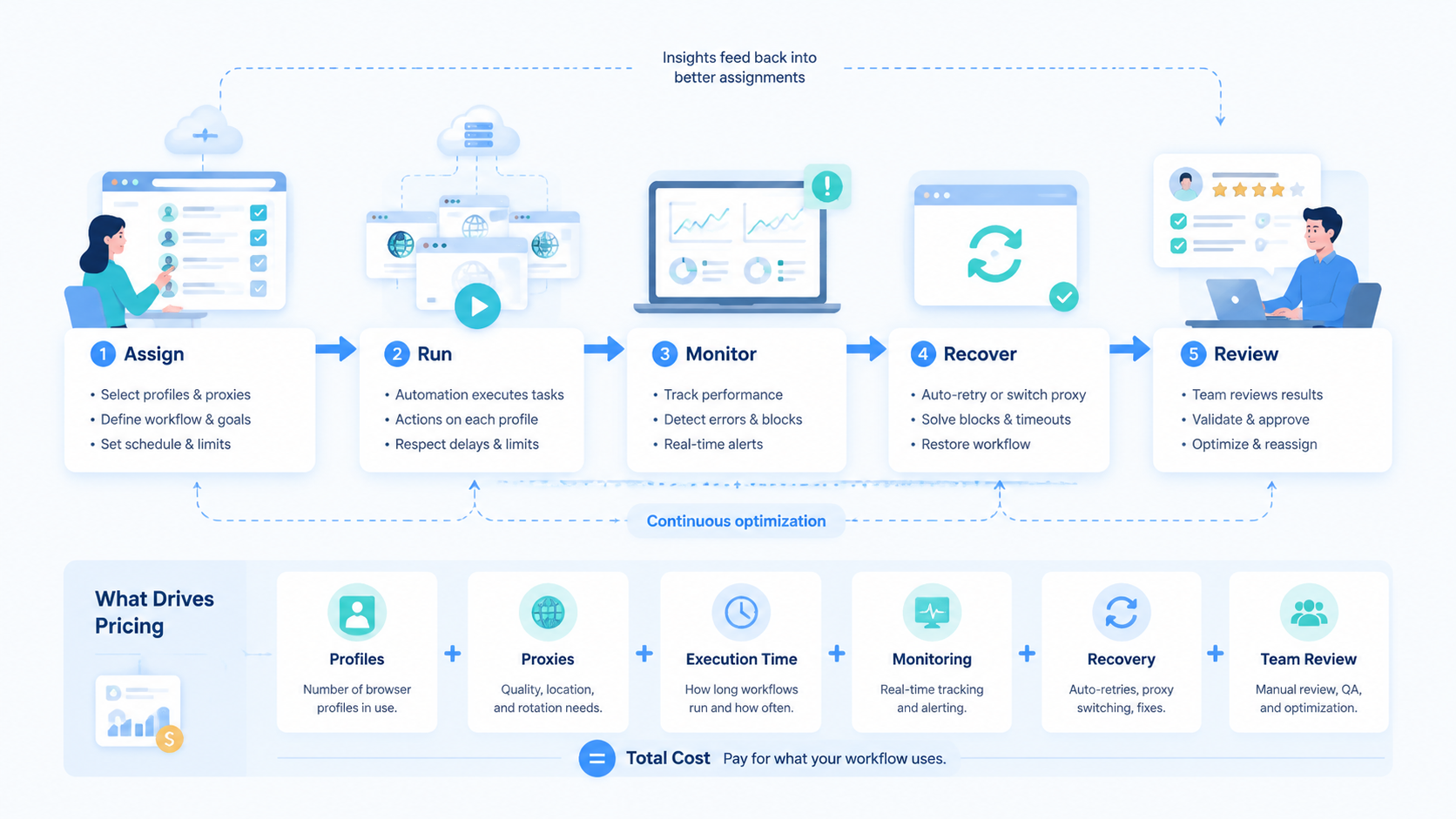
Judge browser workflow costs by controlled completion. Start with account mapping, task frequency, execution environment, recovery time, and review needs.
Before buying or expanding a plan, run one pilot. If the team can complete tasks, explain failures, and recover without guessing, the pricing model is ready for scale.



