
Content Type: guide
The term Discord community automation workflows means structured processes that help social teams moderate, route, reply, publish updates, and review community activity without turning the server into a noisy automation channel. They work best when bots, humans, account environments, and escalation rules are clearly separated.
The operating problem is simple. A community may have product questions, support requests, spam, event reminders, partner updates, and member reports happening in the same server. If every action depends on a person watching channels all day, response quality becomes uneven. If every action is automated, the community can feel unmanaged or spammed.
The right workflow sits between those extremes. Automation should handle routing, reminders, filtering, summaries, and repeatable admin steps. Humans should own judgment, sensitive replies, enforcement decisions, and community tone.
Key Takeaways
- Discord automation should support moderation and routing, not inflate activity.
- Official bots, webhooks, permissions, and AutoMod rules should be planned separately.
- Social teams need owner fields, review queues, and failure logs before scaling.
- Multi-account teams should keep community tasks separate from broader social operations.
- A small pilot is better than automating every channel at once.
What Are Discord Community Automation Workflows?
Discord community automation workflows are repeatable operating paths for server tasks. A workflow can route a member report, summarize unanswered questions, post scheduled updates, trigger a moderator review, or collect activity notes for the social team.
The workflow is not the same thing as a bot. A bot is one execution component. Discord's developer documentation explains that bots can listen to events, respond to commands, moderate servers, send messages, and connect through Gateway WebSocket or HTTP interactions. A workflow decides when those actions should happen, who approves them, and how results are logged.
For example, a brand community may need this path:
- A member asks a product question.
- The bot labels it as support-related.
- The question enters a review queue.
- A support lead approves a short answer.
- The bot posts the answer or flags the thread for manual reply.
- The system records owner, channel, status, and next action.
This type of workflow is useful because it makes the handoff visible. The social team can see whether a question was routed, answered, escalated, or ignored. That matters more than raw automation speed.
Why Discord Community Automation Workflows Matter
The common misunderstanding is that Discord automation is mainly about keeping a server active. That is the wrong target. A healthier target is faster triage, cleaner owner assignment, and fewer missed community issues.
A better goal is operational clarity. Social teams need to know which channels need attention, which moderators are responsible, which messages require escalation, and which automations should stop when context is unclear.
The decision framework has three parts:
| Workflow layer | What it handles | Human boundary |
|---|---|---|
| Filtering | Spam, banned words, repeated patterns, simple routing | Review false positives and appeals |
| Routing | Assigning questions, reports, or leads to the right owner | Decide priority and final response |
| Reporting | Summaries, unresolved issues, handoff logs, task status | Interpret trends and change SOP |
Discord's API reference also documents rate limits and 429 responses. For workflow design, that means retry logic, backoff, and failure logging are not optional engineering details. They are part of responsible community operations.
Automation gives the team a first pass. It does not replace the community manager. It should surface tasks, provide context, and stop when the next action needs judgment.
Key Benefits and Use Cases for Social Teams
Strong workflows reduce repeated coordination work. A social manager should not manually check every channel for the same question. A moderator should not guess whether a post needs support, product, sales, or community review. A lead should not lose the trail after a bot triggers an alert.
Useful Discord workflow categories include:
- Question routing: assign support, product, billing, or sales topics to the right team.
- Moderation triage: surface spam, abuse, risky links, or repeated member reports.
- Event operations: post reminders, collect questions, and summarize unanswered items.
- Community listening: collect recurring feature requests or campaign feedback.
- Lead handoff: move qualified commercial questions into a CRM or manual queue.
These tasks connect naturally to wider team social media operations. A Discord server is often only one part of the social system. The same team may also run X, TikTok, Instagram, Telegram, YouTube, and marketplace accounts.
That broader context matters. A Discord workflow should not live as a disconnected bot script. It should connect to account ownership, content calendars, escalation rules, and weekly reporting. Otherwise, the team gains automation but loses control.
How to Start Discord Community Automation Workflows
Start with one server and one repeated task. Pick a task that already has a manual owner. Good first pilots include spam triage, unanswered question summaries, event reminder flows, or support-routing alerts.
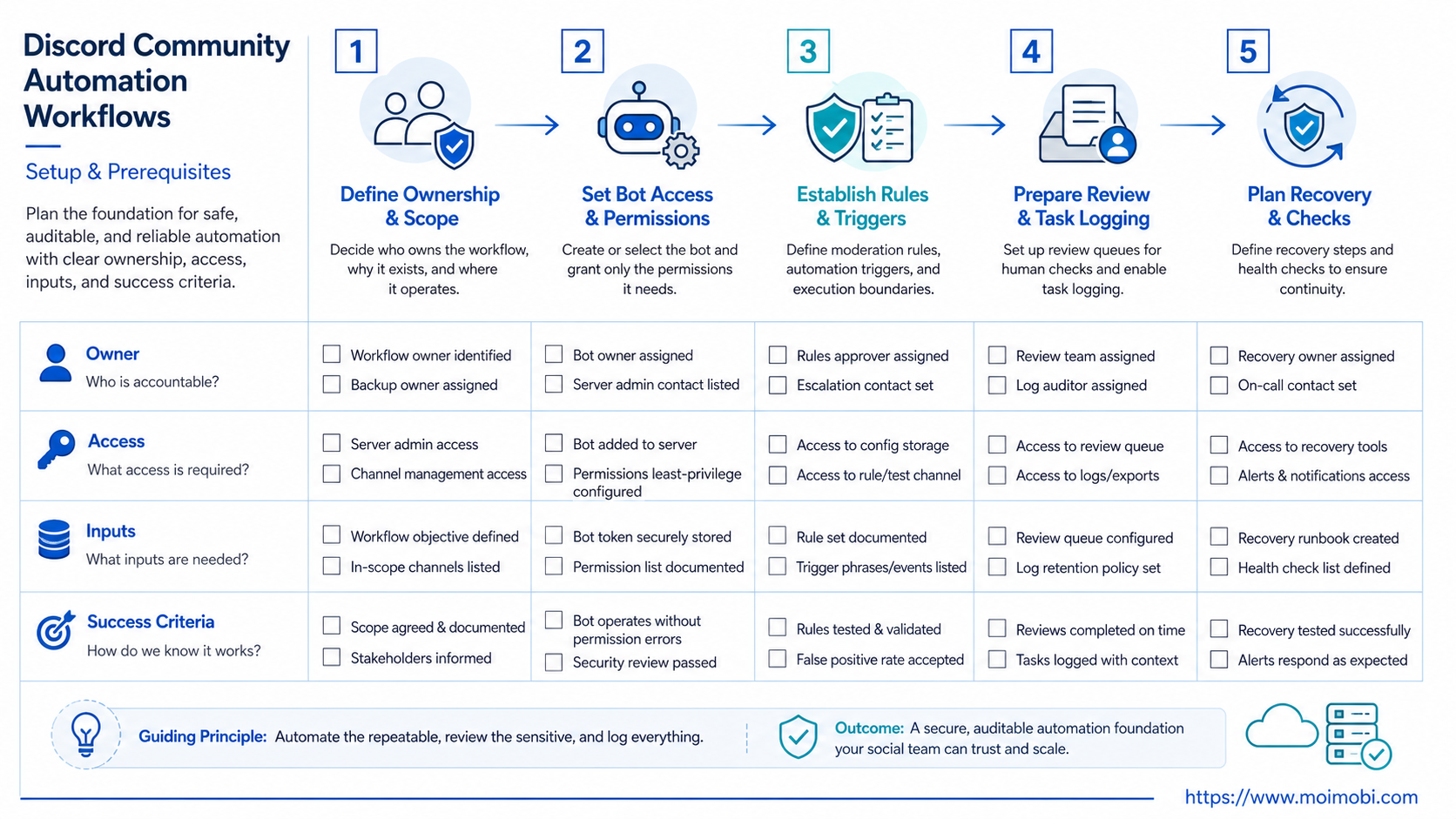
Use this preflight checklist before creating the workflow:
- Server owner and workspace owner are named.
- Bot permissions are documented.
- Channels in scope are listed.
- Actions that require human review are defined.
- Stop conditions are written down.
- Logs include channel, trigger, owner, output, and status.
- Members have a clear way to report issues.
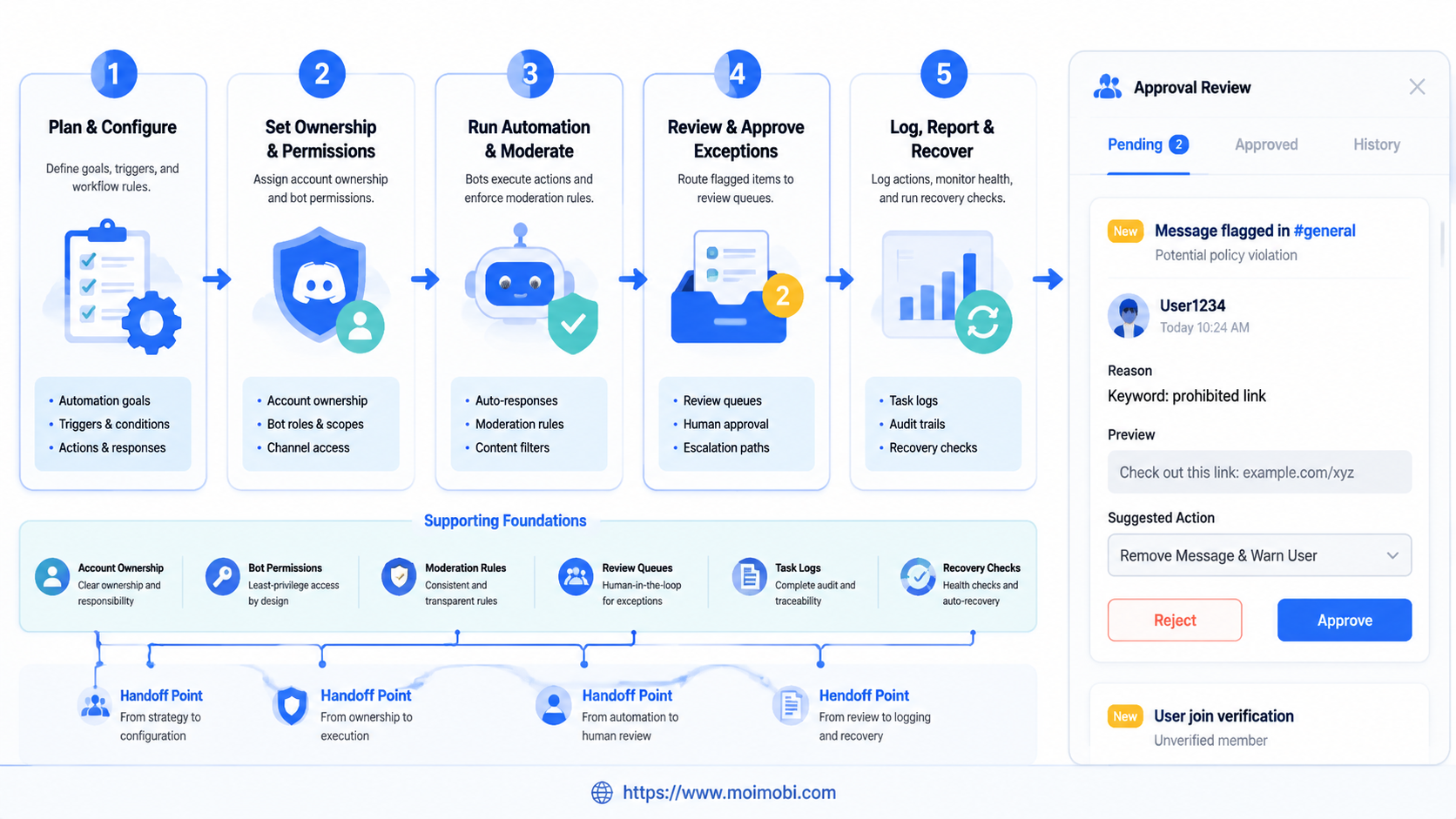
Then build the workflow in this order:
- Map the channels. Separate support, announcements, events, general chat, and private moderator areas.
- Define triggers. Use explicit events, commands, tags, keywords, or moderation flags.
- Assign owners. Every workflow should have a team, person, or role responsible for review.
- Set permission limits. Avoid broad bot rights when a narrower permission is enough.
- Add approval points. Require human review for bans, public brand replies, sensitive support answers, and commercial claims.
- Log outcomes. Record completed, ignored, escalated, failed, or needs-review states.
- Review weekly. Update rules when too many false positives or unresolved tasks appear.
Teams that already manage several channels should connect Discord work to an account ownership workspace. This helps prevent Discord tasks from becoming another isolated queue that no one owns.
A practical workflow record should include these fields:
| Field | Example value | Why it helps |
|---|---|---|
| Trigger | support-question tag |
Shows why the workflow started |
| Channel | #product-help |
Keeps context attached |
| Owner | Support lead | Avoids orphaned tasks |
| Approval state | Waiting for review | Prevents accidental public replies |
| Result | Answered, escalated, failed | Makes weekly review possible |
This record is simple enough for operators to understand. It is also structured enough for a team lead to audit. Without these fields, the workflow becomes a black box.
Fit Boundaries: When Automation Helps and When It Does Not
Automation fits Discord when the task has a clear trigger and a low-ambiguity next step. A member report, slash command, repeated question, event reminder, or keyword match can become a workflow. A nuanced conflict between members may need human review from the start.
- Routing support questions
- Flagging spam or risky links
- Posting approved reminders
- Summarizing unresolved issues
- Generating fake activity
- Replacing moderator judgment
- Handling serious disputes alone
- Sending unsolicited bulk messages
Discord's permissions documentation explains that permissions can be granted at guild level and overridden at channel level. A social team should treat that as a workflow boundary. A bot may need to respond in a support channel, but it may not need broad powers across announcements, private moderator rooms, and sales channels.
For community growth, this means automation should be member-serving. It should improve response routing, safety, and consistency. It should not manufacture engagement or push repeated messages to make the server look more active.
Permission design should follow the same principle. Give the workflow the smallest access that lets it perform the specific job. Then review permissions when a channel, role, or workflow changes. This keeps automation closer to community service than uncontrolled server control.
Common Mistakes to Avoid
The first mistake is giving a bot too much scope. A bot that can read, post, delete, and moderate across every channel may be convenient, but it creates a larger operational surface. Start with the narrowest channel and permission set that supports the pilot.
The second mistake is missing the review queue. Automation often fails when every flagged item becomes either automatic action or ignored noise. A good queue shows priority, owner, reason, and due time.
The third mistake is not separating Discord from other social platforms. A Discord workflow may produce customer questions that belong in a support queue. A TikTok comment may need a different execution path. For teams that run mobile-first social channels, a cloud phone can support app-side workflows while Discord remains a bot and server workflow.
The fourth mistake is using one owner for every task. Community, support, product, and sales questions need different reviewers. One general moderator cannot own every business decision.
Another mistake is ignoring rate-limit behavior. Discord's rate limit documentation says apps should parse rate-limit headers and use retry timing instead of hard coding limits. A social team does not need to manage that technical logic manually, but the workflow should show when a task waits, retries, or fails because of request limits.
Teams should also avoid silent retries. Silent retries can create duplicate alerts, repeated posts, or unclear task histories. A better recovery path marks the task as delayed, records the reason, and lets the owner decide whether to retry.
Pilot Rollout, Measurement, and Recovery Checks
A useful pilot should last long enough to reveal false positives and handoff gaps. Start with one channel and one workflow. Do not add every server role, every bot action, and every external integration on day one.
Measure the pilot with simple operational fields:
- number of triggered tasks;
- number of tasks approved by a human;
- unresolved tasks after 24 hours;
- false positives;
- failed bot actions;
- member reports or complaints;
- time from trigger to owner response.
Recovery matters as much as measurement. A bot may fail because a permission changed, a channel was renamed, a webhook stopped, or a rule produced too many alerts. The workflow should pause, log the reason, and route the issue to an owner.
For teams that combine Discord with mobile social channels, evaluate app-side execution controls separately. Discord bots, browser profiles, and mobile workspaces are different execution domains. Treating them as one generic automation lane makes debugging harder.
Use a simple pilot scorecard:
| Check | Pass signal | Review signal |
|---|---|---|
| Routing quality | Most tasks reach the right owner | Tasks often move to the wrong team |
| Permission scope | Bot access matches the task | Bot has broad unused access |
| Member experience | Alerts and replies feel relevant | Members complain about noise |
| Failure handling | Errors are visible and assigned | Failures repeat silently |
This scorecard makes the rollout decision less emotional. Expand only when the workflow helps the team respond better without adding noise.
Frequently Asked Questions
What are Discord community automation workflows?
They are repeatable processes for routing, moderating, replying, reporting, and escalating Discord community tasks across channels and team roles.
Is Discord automation the same as a bot?
No. A bot performs actions. A workflow defines triggers, permissions, approvals, logs, and recovery.
Can automation replace moderators?
No. Automation can reduce repeated triage. Moderators still handle judgment, disputes, policy interpretation, and member trust.
What should a first Discord workflow automate?
Start with a low-risk task such as unanswered question summaries, event reminders, or moderation triage.
Should social teams use webhooks or bots?
Use webhooks for simple outbound updates. Use bots when the workflow needs events, commands, interactions, permissions, or moderation logic.
How should teams avoid spam-like automation?
Avoid repeated bulk messages, fake activity, unclear consent, and automation that exists only to inflate engagement.
What should be logged?
Log trigger, channel, owner, action, result, failure reason, review state, and next step.
How does MoiMobi fit this workflow?
MoiMobi helps teams connect account-based execution, mobile workflows, and social operations. Discord can remain one community layer inside that wider system.
Conclusion
Discord community automation workflows work when they are designed as controlled operating paths, not as activity machines. The best starting point is one repeated task with a clear trigger, owner, permission boundary, and recovery rule.
Before scaling, write down the server channels, bot permissions, human approvals, and failure states. If the pilot improves routing without creating spam, confusion, or hidden failures, expand the workflow one channel at a time.
The next practical step is a one-page workflow map. List the trigger, bot action, human owner, approval point, log field, and stop condition. If any column is unclear, fix the operating model before adding more automation.
That map also keeps future automation requests grounded in the same operating rules.
References:



