

An Instagram TikTok comment reply tool is a workflow system for collecting comments, drafting responses, routing approvals, and tracking follow-up across creator accounts. For creator operations teams, the best tool is not the one that replies fastest. It is the one that keeps account context, brand voice, and review decisions visible.
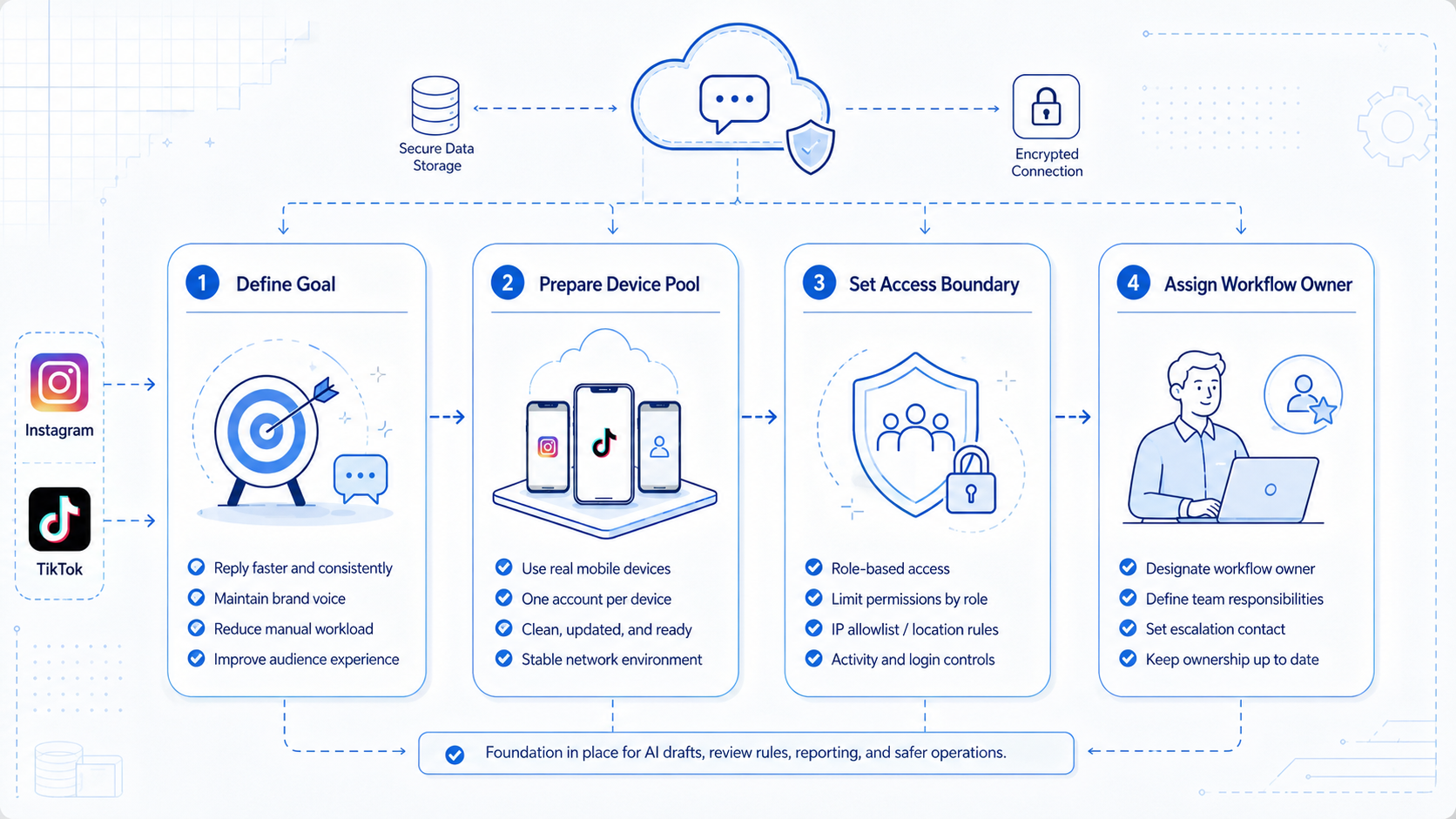
Creator teams usually need three layers. They need AI help for reply drafts, execution environments for account work, and a review queue for public responses. Without those layers, comment work becomes a messy mix of screenshots, chat messages, mobile logins, and unclear ownership.
Moimobi supports this operating model through social media marketing, multi-account management, mobile automation, and cloud phone environments. The goal is controlled comment operations, not unattended public replies.
Key Takeaways
- A comment reply tool should manage collection, drafting, approval, execution, and reporting.
- AI drafts are useful, but public replies still need review rules.
- Instagram and TikTok workflows often need mobile execution, not only web dashboards.
- Account workspaces reduce confusion across creators, campaigns, and clients.
- A pilot should measure review speed, reply quality, escalation rate, and unresolved comments.
- Moimobi fits teams that need account-level execution environments plus workflow control.
What Is an Instagram TikTok Comment Reply Tool?
An Instagram TikTok comment reply tool helps teams manage comment work across both platforms. It may collect comments, group them by intent, suggest replies, route sensitive cases, and record whether an operator responded.
The important word is "tool," not "auto-reply." A serious creator operations team should not publish every AI-generated reply without review. Comments can include customer complaints, creator reputation issues, brand partnership questions, and platform-sensitive topics.
Official platform boundaries matter. TikTok maintains Community Guidelines that cover safety, integrity, authenticity, comments, and direct messages. TikTok also documents developer routes such as its Content Posting API for approved integrations. Meta provides the Instagram Platform for business and creator workflows. A comment reply system should respect these boundaries.
The practical model is simple. Let AI prepare and classify. Let people approve or escalate. Let execution environments keep account work separated. Let reports show what happened.
Why Comment Reply Work Breaks in Creator Teams
Comment work looks small until account count grows. One creator can reply manually. A team managing several creator accounts needs queues, owners, review rules, and context.
The first problem is missing ownership. A comment may look like a support issue, a sales lead, or a brand question. If nobody owns the decision, the reply waits.
The second problem is weak context. A reply drafted without campaign details may sound generic. A reply drafted without account history may miss a sensitive customer issue.
The third problem is account switching. Operators may need to move between Instagram, TikTok, mobile apps, browser dashboards, and spreadsheets. Without device isolation, handoffs become harder to audit.
The best Instagram TikTok comment reply tool reduces those frictions. It does not remove judgment. It makes judgment easier to apply in the right place.
Core Capabilities That Matter
| Capability | What it should do | Why it matters |
|---|---|---|
| Comment collection | Bring comments into one queue | Reduces missed replies |
| Intent grouping | Separate praise, questions, complaints, and leads | Routes work to the right person |
| AI draft support | Suggest reply options from approved tone rules | Saves time without removing review |
| Approval workflow | Require review for sensitive replies | Protects creator and brand quality |
| Account workspace | Tie comments to the right account and environment | Improves auditability |
| Reporting | Track replies, escalations, and unresolved items | Shows operational health |
This table is more useful than a feature checklist. A team may not need every automation feature on day one. It does need a clean path from comment discovery to final response.
Moimobi focuses on the account workspace and execution side. It can support browser and mobile environments for teams that need to work inside real account contexts.
Instagram TikTok Comment Reply Tool Workflow Design
The workflow should be designed before the team chooses any software. A practical Instagram TikTok comment reply tool has four stages: capture, classify, review, and execute. Each stage needs an owner.
Capture is the intake stage. The team decides which posts, campaigns, creators, and languages are included. Not every comment deserves the same workflow. A high-value campaign post may need full review, while older low-volume posts may only need monitoring.
Classify is the decision stage. Comments can be grouped into simple categories such as praise, product question, complaint, lead, spam, and escalation. A small set of categories is easier to manage than a complex taxonomy that nobody follows.
Review is where the team protects brand quality. AI can draft a reply, but reviewers should approve sensitive replies before they go public. The review queue should show the original comment, account, post context, draft reply, category, and reason for escalation.
Execution is where the right account workspace matters. If a response must be made inside the mobile app, the operator needs the right mobile environment. If the task happens in a web dashboard, a browser workspace may be enough. The key is that the action should happen in the account context assigned to that creator or client.
This workflow also keeps the team aligned with official platform routes. When APIs support a use case, teams can use approved integrations. When a workflow needs manual or mobile app execution, teams can keep it inside controlled account workspaces instead of sharing logins informally.
How to Get Started
Start with a review-first workflow. Do not begin by publishing AI replies directly. Begin by collecting comments, drafting options, and asking reviewers to approve or edit.
- Map account ownership. Assign each Instagram or TikTok account to an owner and operator.
- Define comment categories. Use simple groups such as question, complaint, lead, praise, spam, and escalation.
- Write tone rules. Add creator voice, banned phrases, required disclaimers, and escalation triggers.
- Create a review queue. Let AI drafts enter the queue before publication.
- Assign execution environments. Use the right browser or mobile workspace for each account.
- Track outcomes. Record approved, edited, rejected, escalated, and unresolved comments.
The first workflow should be narrow. A good pilot might cover five creator accounts and only comments on campaign posts. That gives enough volume without burying the review team.
Common Mistakes to Avoid
Treating comment replies as a pure speed problem is the first mistake. Fast replies can still be low quality. A poor reply may damage trust faster than a slower, accurate response.
Avoid one shared tone file for every creator. Creator accounts often have different voices, audience expectations, and brand deals. A reply system should store tone by account or campaign.
Ignoring sensitive categories is another risk. Medical claims, refunds, personal complaints, minors, regulated products, and brand disputes should not go through a normal reply path. These cases need escalation.
Another mistake is using automation without evidence capture. The team should know which comment was handled, who reviewed the reply, which account workspace was used, and what happened next.
Teams also make mistakes when they let every account follow the same service level. A product launch account may need replies within hours. A creator awareness account may only need daily review. The tool should let managers assign priority by account, post, or campaign.
Finally, avoid measuring only total replies. A high reply count can hide weak routing, late escalations, or poor draft quality. Managers should track edited drafts, rejected drafts, unresolved comments, and repeated questions. These signals show whether the comment operation is improving.
Fit Boundaries for Creator Operations
This tool category fits teams with repeated comment volume across several creator accounts. Agencies, creator studios, social commerce teams, and brand partnership teams often fit this pattern.
It is also useful when comment work crosses roles. One person may draft. Another may approve. A third may publish or escalate. A queue keeps the handoff visible.
The fit is weaker for a solo creator with low comment volume. Manual replies may be better until repeated delays appear.
The not-fit case is important. Do not use a comment reply tool to create artificial engagement, spam comments, or manipulate platform systems. TikTok's guidelines explicitly address deceptive behavior and fake engagement. A responsible tool should support real customer and community operations.
Pilot Rollout and Measurement
Run the pilot for a fixed period, such as one campaign or one week. The goal is to learn whether the system improves comment handling without reducing reply quality.
Track these fields:
- Account and campaign.
- Comment category.
- Draft source.
- Reviewer decision.
- Final action.
- Escalation reason.
- Time to first review.
- Time to final reply.
- Unresolved comment count.
Review the results at the end of the pilot. If AI drafts are often rejected, improve tone rules. If comments wait too long, adjust reviewer capacity. If escalations are unclear, rewrite the decision rules.
Moimobi is useful when the pilot also needs account-level execution. Teams can connect review decisions to separated browser or mobile workspaces.
Reporting Structure for Managers
Managers need more than reply counts. They need to know whether comment operations support the campaign.
A practical weekly report should show volume, response rate, review delay, escalation categories, unresolved items, and common objections. It should also show which accounts need more support.
This report helps teams improve. For example, repeated product questions may suggest a better caption. Repeated complaints may need a support playbook. High rejection rates may mean the AI prompt or tone rules are weak.
The right tool turns comment work into feedback. That feedback can improve content planning, support operations, and creator briefing.
Example Operating Model
A creator agency can start with a three-role model. The operator collects comments and keeps account workspaces clean. The reviewer approves or edits replies. The account manager owns escalation and client communication.
For example, the operator checks comments every morning for five campaign accounts. AI groups comments into praise, questions, complaints, and leads. The reviewer approves simple replies, edits replies that need brand tone, and escalates refund or partnership questions. The account manager reviews escalations and updates the client summary.
This model is not complex, but it is repeatable. It gives each person a clear handoff. It also gives the manager a weekly view of volume, response quality, unresolved work, and campaign feedback.
Moimobi fits this pattern when the same team needs to move between browser dashboards and mobile app environments. The tool does not need to replace the team's judgment. It should make the operational path visible enough that judgment can be applied consistently.
Frequently Asked Questions
Can an Instagram TikTok comment reply tool publish replies automatically?
It can support reply execution, but creator teams should keep review rules for public responses. Sensitive or brand-facing comments need human approval.
Is AI useful for comment replies?
Yes, AI can draft options, classify comments, and summarize queues. People should still decide final replies when context matters.
What should be automated first?
Start with collection, categorization, and draft preparation. These steps are easier to review than unattended replies.
Does this replace community managers?
No. It reduces repeated handling work. Community managers still own tone, escalation, and relationship judgment.
Do teams need cloud phones?
Cloud phones are useful when the workflow depends on mobile app behavior or account-specific mobile environments.
How does Moimobi help?
Moimobi provides browser and mobile execution environments for account-based comment workflows.
What is the biggest setup mistake?
The biggest mistake is missing review ownership. Every queue needs a reviewer, deadline, and escalation rule.
Is this only for agencies?
No. Creator studios, social commerce teams, and in-house brand teams can also use the model.
Conclusion
Choose comment reply tooling in this order: workflow control first, review quality second, execution environment third, and AI speed fourth. That order keeps the system practical.
For Instagram and TikTok creator operations, the best tool should not simply push more replies. It should help teams collect comments, draft responsibly, approve consistently, execute in the right account workspace, and learn from the results.
Moimobi is a strong fit when comment operations require real browser and mobile execution across multiple creator accounts.



