
How to manage multiple Instagram accounts with cloud phones means assigning each account to a controlled mobile workspace, then using clear ownership, review rules, and task logs to keep operations organized. The goal is not to make risky shortcuts. The goal is to reduce account mix-ups and manual coordination.
Cloud phones are useful when Instagram work depends on mobile app context. Teams may need to publish, reply, monitor, review notifications, or hand off account tasks without passing physical devices around.
Moimobi provides cloud phone and mobile automation environments for teams that manage repeatable account workflows. It also supports broader multi-account management when browser and mobile work need to stay connected.
Key Takeaways
- Give each Instagram account a dedicated workspace, owner, and task log.
- Use cloud phones for mobile app workflows, not as a generic shortcut.
- Separate publishing, reply, monitoring, and recovery rules.
- Review sensitive comments and messages before responding.
- Track failed tasks before scaling to more accounts.
- Keep platform policies and disclosure rules in the workflow.
Pre-Setup Requirements and Checks for How to Manage Multiple Instagram Accounts with Cloud Phones
Do not start by opening every account on every device. Start with a simple operating map.
Each account should have:
- account name or internal ID
- assigned owner
- assigned cloud phone
- platform role, such as creator, brand, support, or test
- allowed workflows
- review triggers
- recovery owner
Instagram's Community Guidelines are a useful policy reference when designing comment, DM, and content workflows. Meta's Platform Terms also matter when teams connect tools or build platform-connected processes.
The practical rule is simple. If an account has business value, it should not live in a shared, unclear workspace. Give it a defined place to run and a defined person to review it.
The Core Workflow for How to Manage Multiple Instagram Accounts with Cloud Phones
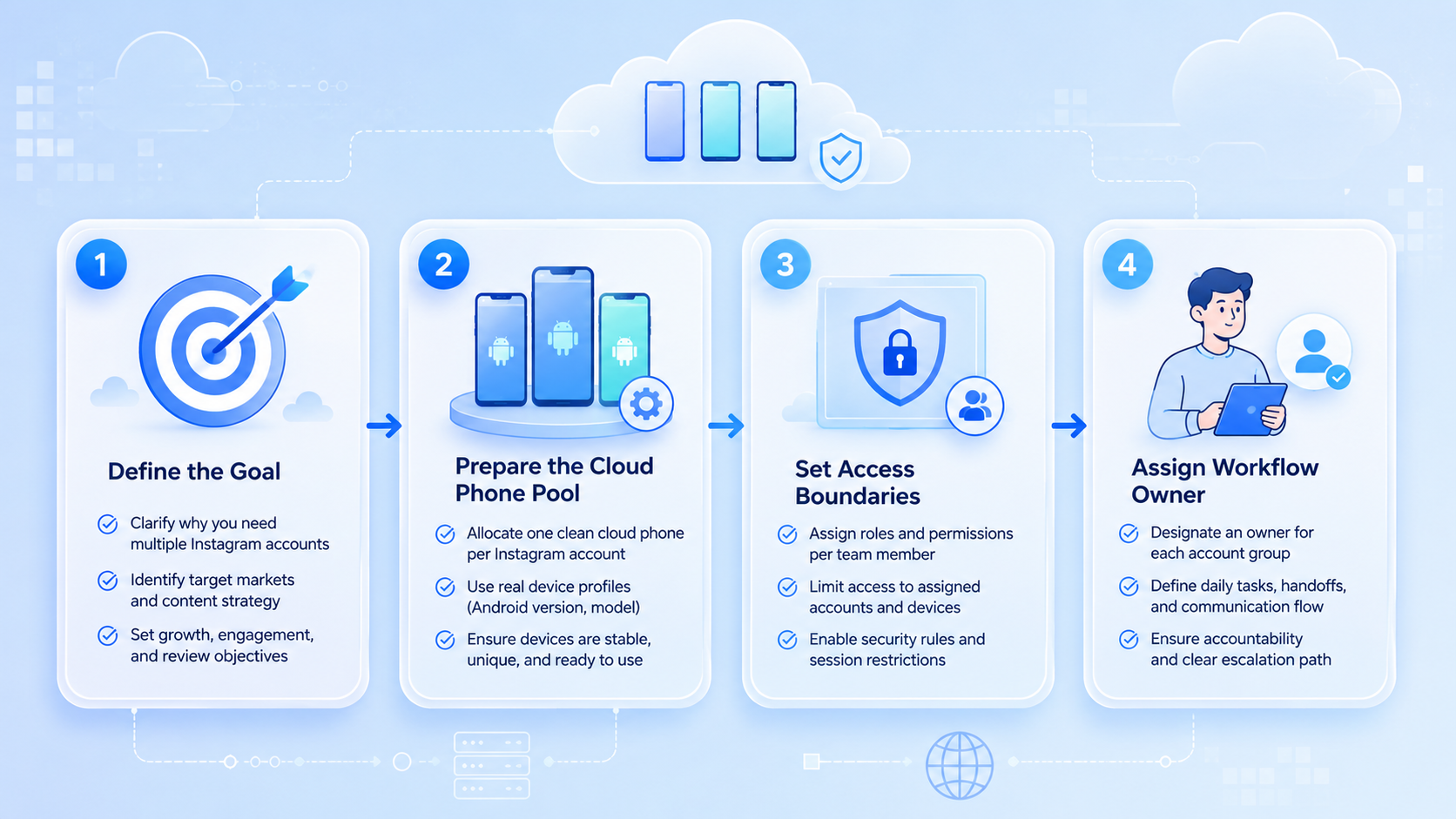
Use a repeatable sequence for every account group.
- Map accounts. List the profiles, owners, use cases, and current status.
- Assign one workspace. Connect each account to one primary cloud phone.
- Define workflows. Mark whether the account handles posting, comments, DMs, monitoring, or reporting.
- Add review rules. Route complaints, pricing, endorsements, and sensitive replies to a human reviewer.
- Record task outcomes. Log success, failure, manual takeover, and next action.
- Review weekly. Check owner drift, unused workspaces, and repeated task failures.
This sequence keeps the team from treating cloud phones as random device slots. Each device becomes part of a managed account workspace.
For app-based work, mobile automation can connect assigned tasks with controlled execution. The important part is that the task, account, and workspace stay linked.
How to Verify the Setup Is Working
A working setup should be easy to audit. Managers should know which account ran which task and where the task happened.
Use this pass/fail check:
| Check | Pass condition |
|---|---|
| Account mapping | Every active account has one assigned workspace |
| Ownership | Every workspace has a named owner |
| Task history | Recent actions have result notes |
| Review routing | Sensitive replies are paused for approval |
| Recovery | Failed tasks have a retry owner |
| Access control | Operators only use assigned workspaces |
FTC guidance matters when Instagram content includes endorsements or paid relationships. The FTC's Endorsement Guides explain disclosure expectations. Teams should keep those cases in a review path.
Where Teams Usually Get Stuck
The first blocker is unclear ownership. If three people can operate the same account without a task log, mistakes become hard to trace.
The second blocker is over-automation. A tool may queue tasks, but humans should still review sensitive replies, sponsorship content, customer complaints, and account changes.
The third blocker is workspace drift. An account starts on one cloud phone, then gets opened elsewhere during a busy week. That breaks the operating map.
Common fixes:
- pause tasks when workspace ownership is unclear
- keep one account-to-workspace record
- avoid shared operator notes in chat only
- review failed tasks every week
- use device isolation when accounts need separated mobile environments
Next Steps After the First Pass
After the first setup, group accounts by workflow. Do not manage every profile with one rule.
Example groups:
- creator accounts for publishing and comment review
- brand accounts for campaigns and approvals
- support accounts for customer replies
- test accounts for workflow validation
- region-specific accounts for localized content
Then define a small operating rhythm. Daily checks can cover pending comments and failed tasks. Weekly checks can cover owner drift, inactive devices, account status, and content backlog.
For teams running both web and app workflows, Moimobi's social media marketing use case can sit beside cloud phones. Browser dashboards and mobile workspaces should not be managed as separate worlds.
Who It Fits and When It Is a Strong Match
Cloud phones fit teams that need persistent mobile environments for account work. Agencies, creator teams, cross-border sellers, and social support teams usually need more structure than one shared handset.
The setup is also useful when operators are remote. A manager can assign an account workspace without shipping a physical phone or asking staff to use personal devices.
It is not the right answer for every use case. A solo creator with one account may not need a full cloud phone workflow. Native app switching may be enough when there is no team handoff or review process.
Strong match
- Multiple Instagram accounts
- Remote operators
- App-based publishing or replies
- Client account separation
- Review and recovery workflows
Weak match
- One personal account
- No operator handoff
- No mobile-only task
- No need for logs
- No account grouping
Pilot Rollout, Measurement, and Recovery Checks
Start with 5 to 10 accounts. Assign each one to a cloud phone and run only two workflows at first, such as publishing and comment review.
Track practical signals:
- completed tasks
- missed publishing windows
- comments waiting for review
- failed login or app steps
- manual takeover count
- wrong-workspace attempts
- recovery time
Recovery checks matter because account restriction recovery on cloud phones is not only a technical issue. The team needs to know which account paused, which workspace was involved, and which action should stop until review.
After 14 days, review the account map. Keep workspaces that are clean. Pause accounts with repeated failures. Do not scale until operators can explain the process without guessing.
Frequently Asked Questions
What is the first step?
List the accounts, owners, workflows, and current status. Then assign each account to one primary cloud phone.
Is this safer than using physical phones?
It can be easier to manage, but it does not remove platform rules or review needs. Treat it as an operations system.
How many accounts should one cloud phone handle?
Use a conservative assignment model. The key is clear ownership and traceable history, not maximum density.
Can teams automate posting?
They can automate parts of the workflow, but captions, approvals, sensitive content, and failed tasks still need review.
What should be logged?
Log task type, account, workspace, owner, result, failure reason, and next action.
When should a task be paused?
Pause when the account owner is unclear, a sensitive reply appears, or the workspace does not match the account record.
Does Moimobi support broader account workflows?
Yes. Moimobi combines cloud phones, device isolation, mobile automation, and multi-account management for team workflows.
Conclusion
Managing multiple Instagram accounts with cloud phones works best when each account has a defined workspace, owner, task log, and review path. The cloud phone is the execution environment. The operating rules make it manageable.
Start with a small account group. Verify mapping, ownership, task history, and recovery rules before adding more accounts.



