

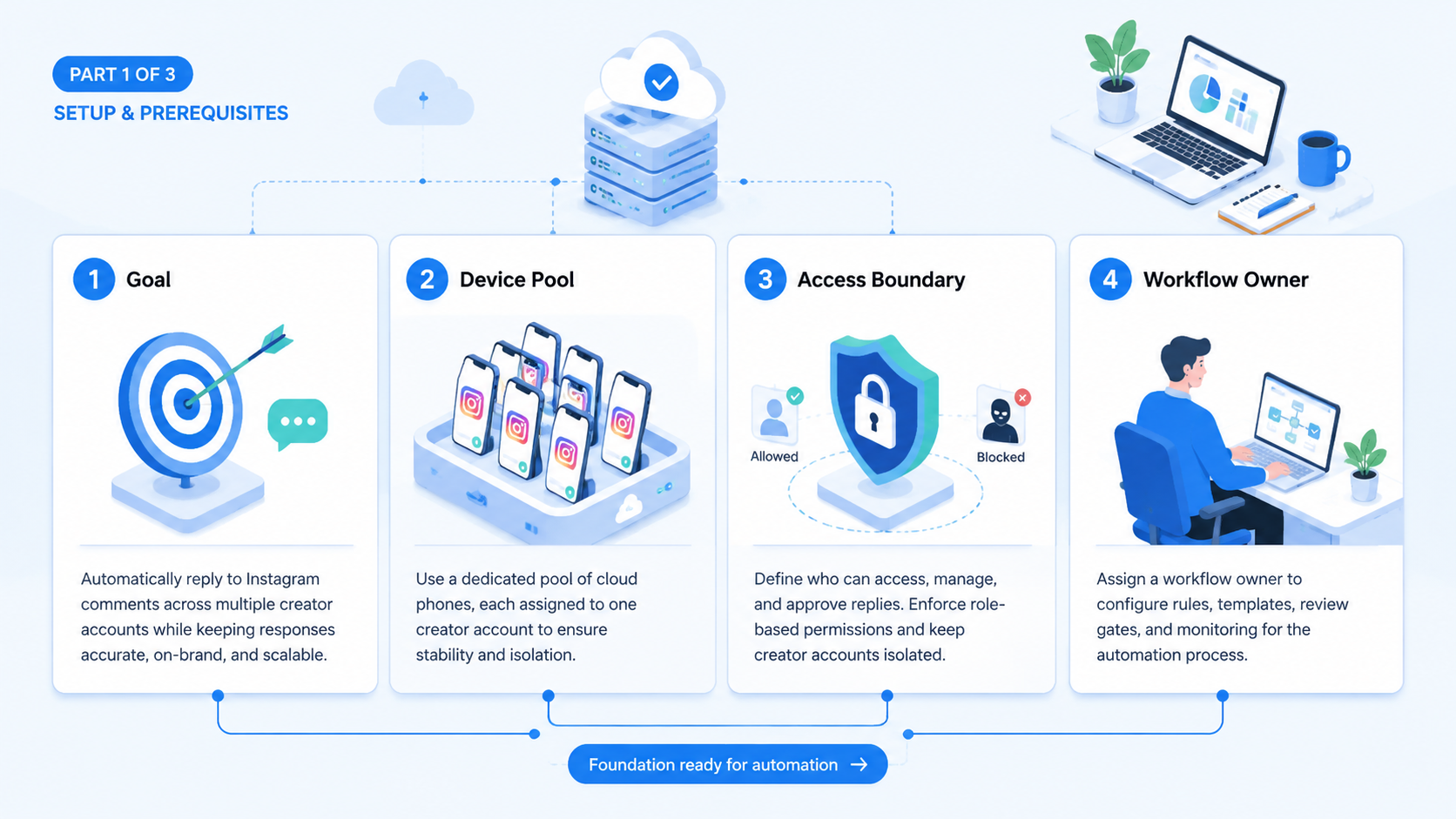
To reply to Instagram comments automatically across creator accounts, build a workflow that collects comments, classifies intent, drafts safe responses, routes sensitive cases to human reviewers, and records the final action. The goal is not to let software answer everything. The goal is to reduce repetitive reply work while keeping account context and brand judgment visible.
Creator teams need a different setup from a single personal account. They may manage several creators, regions, brand deals, products, and support questions. A comment workflow must know which account is speaking, which tone applies, and which replies require approval.
Instagram's official manage comments documentation shows that comment actions depend on platform capabilities and permissions. Teams should use official API routes where they fit. When they use browser or mobile execution, they should keep review controls and account separation.
Key Takeaways
- Comment automation should start with classification and drafts, not blind auto-posting.
- Creator accounts need account-specific voice, approval rules, and escalation paths.
- Sensitive replies should pause for human review.
- Templates should use approved facts, not generic AI responses.
- Measure reviewer edits, classification quality, response time, and account mix-ups.
What It Means to Reply to Instagram Comments Automatically
To reply to Instagram comments automatically means to use a workflow that handles repetitive comment work with rules and review. It may collect comments, classify intent, draft replies, suggest templates, route comments to the right owner, and post approved replies.
The safest model is not "AI writes and posts." It is "AI prepares and routes." A human can approve replies that affect brand trust, customer support, partnerships, or sensitive claims.
For creator accounts, this distinction matters. One creator may use a playful tone. Another may need strict sponsor language. A third may need customer support escalation. The workflow should not treat all accounts as one voice.
Policy and Data Boundaries Before You Reply to Instagram Comments Automatically
Comment workflows need a policy boundary before they need more automation. Meta's inauthentic behavior policy warns against misleading identity and coordinated misuse. That means the workflow should not be framed as a way to create fake engagement or hide who is speaking.
Data handling also matters. Meta's Platform Terms define expectations for developers using platform tools and data. A creator team should avoid storing more comment data than it needs. It should also restrict who can see customer questions, creator business inquiries, or potentially sensitive messages.
Build three boundaries into the process:
- approved sources for product or campaign facts;
- reviewer rules for sensitive replies;
- retention rules for comment exports and logs.
These checks keep the workflow closer to normal operations. They also make the system easier to explain to managers, creators, and support teams.
Step 1: Build Comment Categories
Start with categories before tools. Categories decide which replies can be drafted, which need review, and which should be escalated.
| Comment category | Suggested workflow | Review level |
|---|---|---|
| Praise or emoji | Optional short reply | Low |
| Product question | Draft from approved product notes | Medium |
| Sponsorship question | Route to partnership owner | Required |
| Complaint | Escalate to support | Required |
| Sensitive claim | Do not auto-post | Required |
| Spam or abuse | Flag for moderation | Human or policy check |
| Creator collaboration | Route to business owner | Required |
This table prevents the common mistake of building one reply rule for every comment. The work starts with intent, not automation speed.
Step 2: Map Creator Accounts and Review Owners
Every creator account should have its own workspace, voice rules, reviewer, and escalation contact. Shared sessions make it harder to know who replied, which template was used, and why a comment was skipped.
Use multi-account management to map accounts before building reply logic. The map should include account name, creator owner, brand voice, campaign notes, reviewer, reply categories, and execution route.
For teams that need browser and mobile surfaces, mobile automation can be combined with browser workflows. Instagram comment review may happen in different places depending on account permissions and team tools.
Account mapping should answer five questions:
- Which creator account owns this comment?
- Which tone and sponsor rules apply?
- Which comments can be drafted automatically?
- Which reviewer approves public replies?
- Where is the final action recorded?
Step 3: Create the Reply Workflow
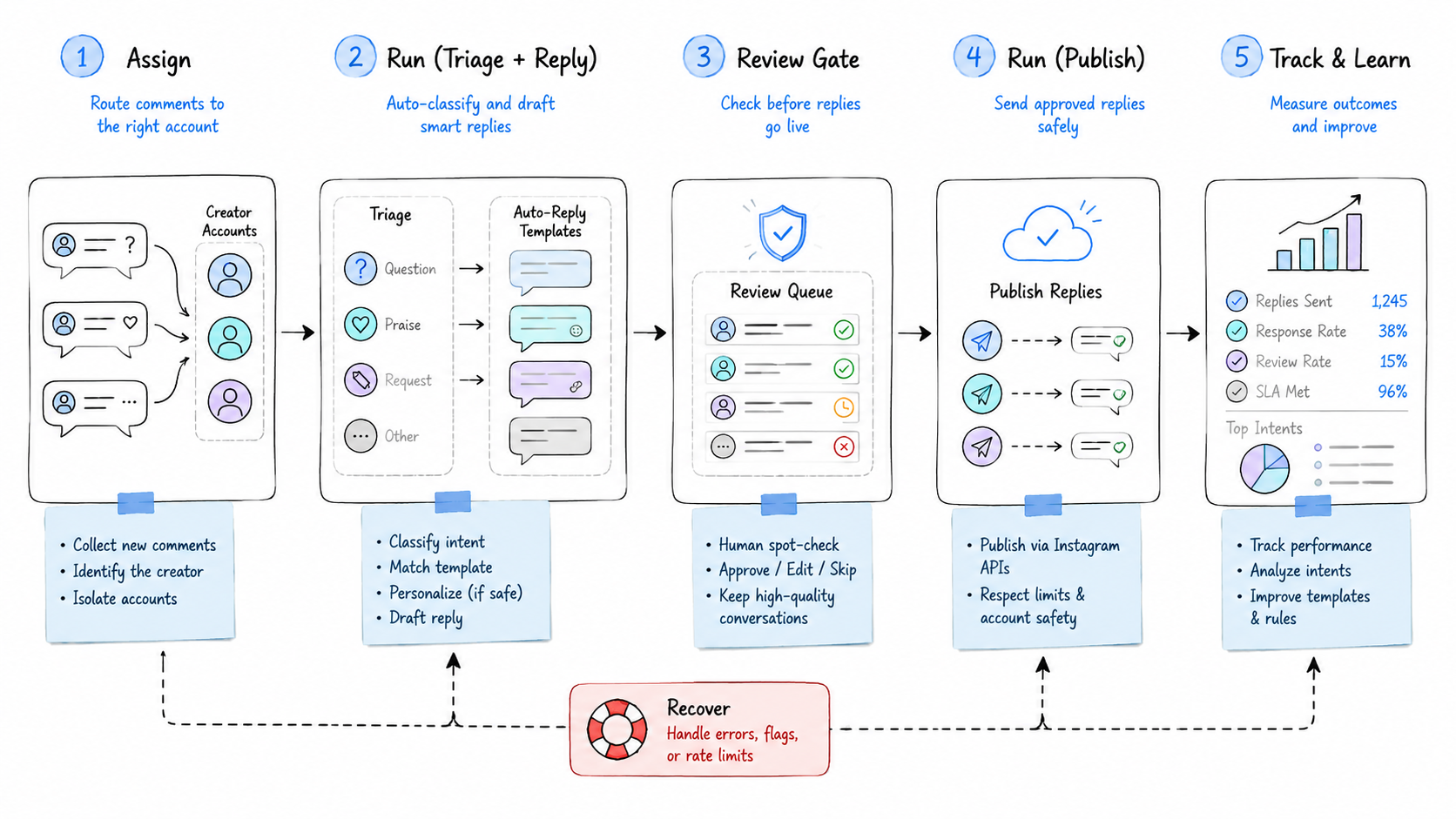
The workflow should be simple enough to audit. Use a sequence that separates collection, drafting, review, execution, and reporting.
- Collect comments. Pull new comments from the approved account workspace or API route.
- Classify intent. Tag each comment as praise, product, sponsor, support, complaint, spam, or collaboration.
- Match reply rules. Use approved creator voice, product notes, and campaign context.
- Draft the reply. Keep the draft short and specific to the comment.
- Pause sensitive replies. Send complaints, sponsor questions, and uncertain cases to a reviewer.
- Post approved replies. Execute only after account, permission, and review checks pass.
- Log the result. Store account, category, template, reviewer, status, and exception reason.
This flow works whether the team uses a custom tool, a workflow builder, or an execution platform. The core idea is traceability. Every reply should have a source comment, account, rule, and status.
Step 4: Choose API, Browser, or Mobile Execution
Official API routes are preferable when they support the required action and the account has valid permissions. They are easier to log and control. The Instagram documentation should be checked before assuming a specific action is available.
Browser workflows may fit review dashboards, moderation queues, or reporting. Mobile execution may fit tasks that depend on app-specific context. Moimobi's device isolation is useful when teams need separated account environments across those surfaces.
Use this decision rule:
| Route | Use when | Watch out for |
|---|---|---|
| API | Official capability supports the task | Scopes, app review, account permissions |
| Browser | Review or dashboard work is web-based | UI changes, login state, session control |
| Mobile | App context is required | Account workspace, device state, run logs |
| Human | Reply is sensitive or ambiguous | Escalation speed and ownership |
This route map also helps teams compare the best Instagram comment automation tools. The best system is the one that fits account context and review needs, not only the one that replies fastest.
Step 5: Build Approved Templates
Templates should be tied to creator voice and approved facts. A creator account is not a generic brand channel. The same product question may need different tone, length, or sponsor wording across accounts.
Create templates for:
- thanks and lightweight engagement;
- product details;
- shipping or availability;
- campaign disclaimers;
- creator collaboration routing;
- support escalation;
- moderation notes.
Each template needs stop rules. A discount answer should stop if the offer expired. A product answer should stop if the claim is not in approved notes. A complaint should go to support instead of receiving a casual response.
Teams using n8n-style automation patterns should keep this rule: workflow orchestration is not the same as reply quality. The system still needs approved sources and human checkpoints.
Step 6: Verify Before Scaling
Verification should happen on a small account group first. The pilot should prove that the workflow improves response handling without creating brand or support risk.
Use this pass/fail checklist:
| Check | Pass condition | Fail signal |
|---|---|---|
| Account context | Reply matches the correct creator account | Wrong account or tone |
| Classification | Comments land in correct categories | Frequent reviewer recategorization |
| Template quality | Drafts need light edits | Full rewrites are common |
| Review routing | Sensitive comments pause | Sensitive replies post automatically |
| Logging | Status and exceptions are recorded | Operators rely on screenshots |
| Recovery | Failed runs show next action | Failure reason is unclear |
Measure reviewer edits, response time, classification accuracy, skipped comments, and account mix-ups. If reviewers rewrite most drafts, improve templates before expanding.
Add one account-handoff test. Ask a second operator to take over a creator account after a failed run. They should understand the comment category, draft status, reviewer, execution route, and next action without asking the original operator. If they cannot, improve the run log before adding more accounts.
Also test campaign changes. A sponsor disclosure, discount code, or launch date can change during a campaign. The workflow should not keep using old templates after the source facts change. A simple "template last reviewed" field can prevent stale replies.
Scaling Across Creator Accounts
Scaling should happen account by account. Add accounts that share similar comment categories first. Do not mix a beauty creator, a finance creator, and an e-commerce support account into one rule set on the first rollout.
Use a staged rollout:
- Start with one creator and low-risk categories.
- Add a second creator with similar tone and products.
- Compare reviewer edits across both accounts.
- Add campaign-specific templates only after the base categories work.
- Expand to more sensitive categories after escalation is proven.
This sequence keeps quality visible. It also shows whether the automation is helping operators or only moving review work to a different place.
Common Mistakes and Troubleshooting
Avoid these mistakes:
- Posting without review: draft first, then approve.
- Using one template for every creator: account voice matters.
- Skipping escalation rules: complaints and sponsor questions need owners.
- Ignoring permissions: API and account access can limit what is possible.
- No approved fact source: AI should not invent product or campaign claims.
- No failure log: every skipped comment needs a reason.
- Scaling too early: test with a small account group first.
If the workflow fails, check account login, permission scope, comment visibility, template source, reviewer assignment, and execution route. Most failures come from unclear account context or missing approval rules.
Frequently Asked Questions
Can I reply to Instagram comments automatically?
Yes, but the safer workflow drafts and routes replies before public posting. Sensitive comments should require human review.
What is the best Instagram comment automation setup?
The best setup combines account mapping, comment categories, approved templates, review gates, and clear logs.
Can one workflow handle many creator accounts?
Yes, if each account has its own voice rules, reviewer, and workspace. Do not treat all creators as one account.
Should complaints be automated?
No. Complaints should be escalated to a human or support owner. The system can classify and route them.
Do I need mobile execution?
Not always. Use mobile execution when app-specific context matters. Use browser or API routes when they fit the workflow.
Can GitHub tools automate Instagram comments?
Some tools may help with parts of a workflow, but teams must still check permissions, account safety, review rules, and maintenance.
How do I measure success?
Track response time, reviewer edits, classification accuracy, skipped comments, failed runs, and account mix-ups.
What should stay human-controlled?
Sponsor questions, complaints, legal issues, product claims, personal data, and creator partnerships should stay human-reviewed.
Conclusion
The practical way to reply to Instagram comments automatically is to automate the workflow around replies, not remove judgment from the process. Collect comments, classify intent, draft safe responses, route sensitive cases, and record the result.
For creator teams, account context is the hard part. Start with a small account group, map creator voice and review ownership, then expand only after the workflow passes quality and recovery checks.



