
To manage secure browser profiles, protect saved login state and verify who can use each account. Begin with account-owner approval, named operators and the platform's supported access controls. The output should be a reviewed profile record and a tested handoff, not a claim that separate browser windows make an account secure.
This guide focuses on session handling and access removal. It is not a vendor buying checklist or an automation setup tutorial. Mobile-only work belongs in a separate cloud phone assessment; the browser procedure below does not establish mobile access or app compatibility.
Key Takeaways
- Treat saved login state as sensitive access material.
- Check account identity before each handoff.
- Keep credentials and session values out of shared evidence.
- Verify access removal through supported platform controls.
- Separate privacy claims from observed security checks.
Prepare secure browser profiles without copying sensitive state
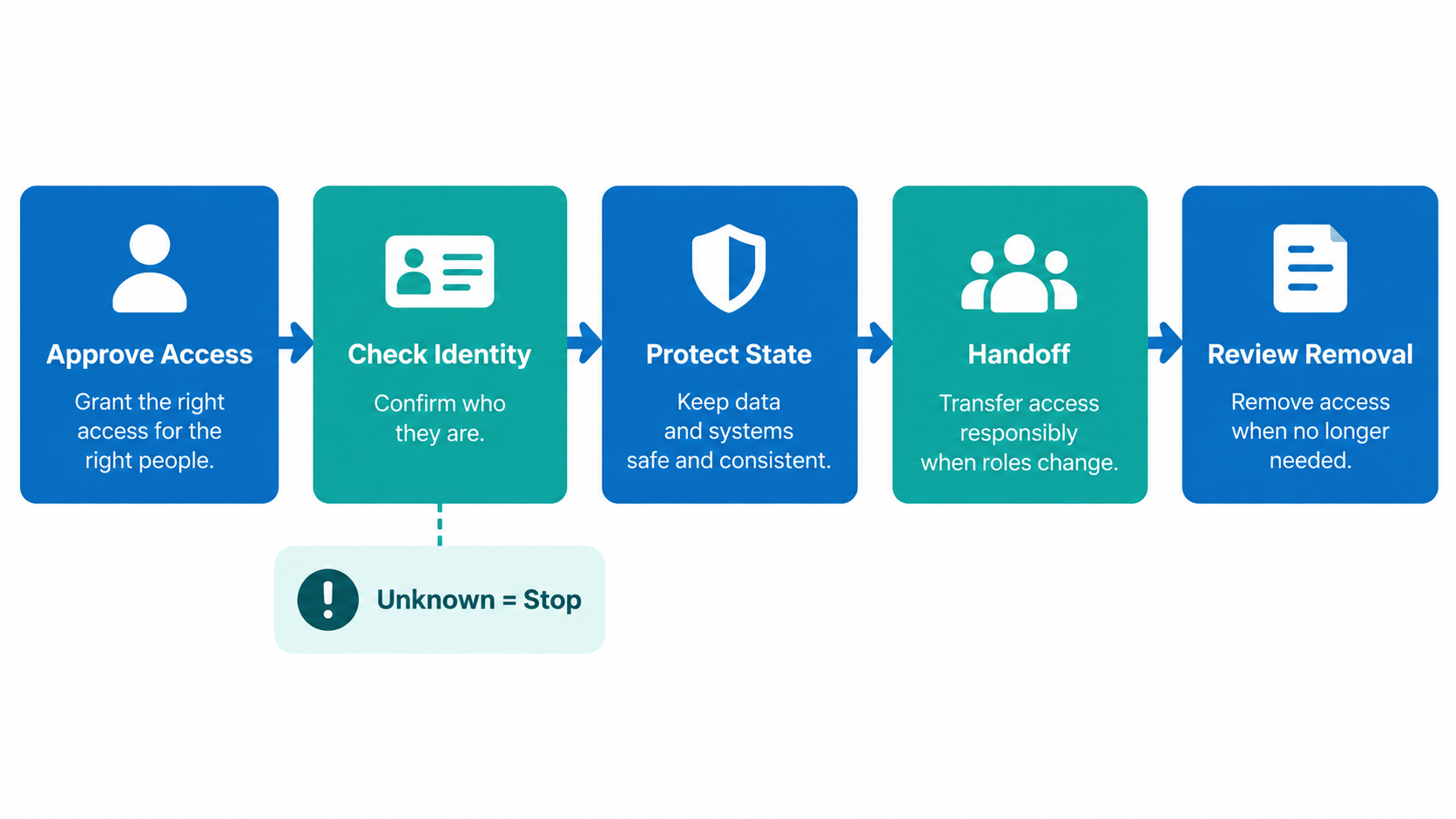
Create a small register with profile reference, platform, account owner, allowed operator and approved task. Keep passwords, cookies and recovery codes elsewhere in approved storage. A register should identify responsibility without becoming another place to expose login material.
Saved browser state deserves particular care. Playwright's authentication guide warns that state files can contain cookies and headers usable for account impersonation. It discourages committing them even to private repositories. That warning concerns test files, but it gives teams a concrete reason to review any exported authenticated state.
Before handing a profile to another person, ask what the export contains and where it will go. A configuration label and a live session are different objects. Do not place an export in a shared chat just because its filename looks harmless. If the contents are unknown, stop and ask the account owner or responsible administrator.
For broader environment choices, see the browser-profile alternatives discussion. Environment selection comes first; protecting the resulting session material is a separate operational responsibility.
A five-step access and handoff procedure
- Approve the operator. Record the account owner and permitted role before opening an authenticated profile. Use the platform's supported team access where available. If approval is missing, leave the profile closed.
- Check identity. Open only the assigned environment and inspect the visible account identity without changing content. Compare it with the register. A mismatch means stop, not switch accounts inside an uncertain session.
- Check the workspace. Confirm which profile files, exports and recordings are accessible to that operator. Remove unnecessary sharing through the team's approved process. Record unresolved exposure for administrator review rather than deleting unknown files.
- Complete the handoff. Let the receiving authorized operator repeat the identity check. Record the task, owner and next action without copying message content or session values. The handoff is incomplete until the receiver confirms the correct account.
- Review access changes. When duties change, use the platform and workspace's supported removal controls. Have the responsible administrator verify the result. Retain the review outcome, not sensitive credentials, in the record.
This is a proposed team procedure, not a transcript of a Moimobi test. Adapt it to supported controls and client agreements. For account responsibility across multiple environments, review the multi-account ownership structure.
Verify secure browser profiles with evidence that does not expose access
A useful check shows who was permitted to work, which account appeared and whether the handoff matched the assignment. It does not need a cookie dump. Use a redacted screenshot or a short review note when permitted; avoid collecting private conversation content merely to prove the profile opened.
OWASP's session guidance advises against logging raw session identifiers. It also explains that browser-close events cannot reliably enforce logout. Its server-side guidance is for application developers; operators must use the social platform's supported session controls instead of inventing equivalent local actions.
For an access-removal review, ask the administrator to inspect the relevant account and workspace permissions. Use a permitted check of the removed operator's access where the platform supports one. Mark unknown results unresolved. A closed window, hidden profile tile or deleted local shortcut is not sufficient evidence of server-side revocation.
Repeat the review after a change in ownership or working location. Keep the date, reviewer, observed result and remaining gap. Avoid marking every profile secure based on one successful check of a different account.
Limits and failure paths
Session protection and fingerprint privacy answer different questions. The W3C fingerprinting guidance describes mitigation limits, including uncertainty about traffic correlation. It is a Group Note, not certification of any browser product. Profile separation alone does not establish anonymity, platform approval or account protection.
An exposed session file needs a controlled response. Stop sharing or using the affected material and notify its owner. Ask the administrator which supported session invalidation or recovery actions apply. Preserve only the evidence needed for review; do not circulate the file to demonstrate the problem.
An identity mismatch needs a different response. Pause the task and confirm the assignment before making external changes. Repeatedly reopening the same unclear environment does not resolve ownership. An expired login also requires the account owner's approved authentication process, not a borrowed session from another employee.
Moimobi's execution-environment positioning can help frame browser and mobile responsibilities. It does not prove a credential vault, platform-wide revocation or a completed security audit. Confirm each relevant capability independently before relying on it for a client workflow.
Frequently Asked Questions
What makes a browser profile secure?
Controlled access, protected session material and checked ownership matter. A label or a separate window is insufficient evidence.
Can we email authenticated profile exports?
First establish what the export contains. Use only an approved sharing path, with owner permission and a defined recipient.
Does closing the browser remove platform access?
Do not assume that it does. Use supported account controls and verify their effect for the relevant platform.
Should task logs include cookies?
No. Record the review outcome and necessary references without exposing raw session identifiers or credentials.
How should a departing operator be handled?
Ask the responsible administrator to remove supported account and workspace access, then review the result. Track unresolved checks.
Are fingerprint settings a substitute for access controls?
No. Privacy settings do not decide who is authorized to use a business account or handle its session files.
Must every team buy a dedicated profile platform?
Not necessarily. Evaluate the actual task and supported team access first. Protect sessions regardless of the chosen environment.
Conclusion
Secure browser profiles require a clear lifecycle: approve access, verify identity, protect saved state, hand off responsibly and review removal. Keep evidence useful without turning it into another exposure path.
Start with one authorized profile and record what can actually be verified. Resolve unknown ownership or session handling before expanding the procedure to the rest of the team.



